System Description
Overview
The Delta ABS kit includes the necessary components to add anti-lock braking to track cars including a hydraulic modulator with integrated electronic control, wiring loom and all sensors, indicators and switches provided as part of the kit. This kit can be used to provide anti-lock braking control to two hydraulic braking circuits, one circuit feeding the front brakes and the other the rear brakes.
Important Safety Considerations
The Delta ABS system has been designed specifically for use in the motorsport environment. The system is not approved, tested or calibrated for use on the public highway and it is the sole responsibility of the system user to ensure that it is not used on the public highway under any circumstances. Specialist Control Systems Ltd will not be responsible or liable for any damage, to any party, arising for the system being used on the public highway.
The Delta ABS system has been designed specifically for use by motorsport professionals with prior knowledge and experience in the installation and use of motorsport electronic systems. Whilst every effort is made to ensure quality in manufacturing and design, the system cannot be guaranteed to work without malfunction, and it is the user's responsibility to be capable of controlling vehicle in case of system failure or unexpected behaviour.
The ABS system has been to designed to work as it is shipped. It is therefore not possible for the user to adapt any part of the system or replace any of the parts making up the system without prior approval of Specialist Control Systems Ltd.
It is essential that the system is installed according to the instructions in Section 3. Installation must be carried out by an experienced motorsport fitter. The ABS fault light (MIL) must be installed so that it is easily observed by the driver. The ABS ON/OFF switch and rotary slip switch must also be installed so that they are within easy reach of the driver.
Replacement parts must only be purchased from Specialist Control Systems Ltd or one of its approved distributors as the system has been calibrated and designed to work only with the parts included in the kit. No support is offered for kits having unapproved replacement parts or a modified wiring loom. Please note that Specialist Control Systems Ltd does not offer technical support for kits or parts that have been purchased second hand.
What’s in the Kit
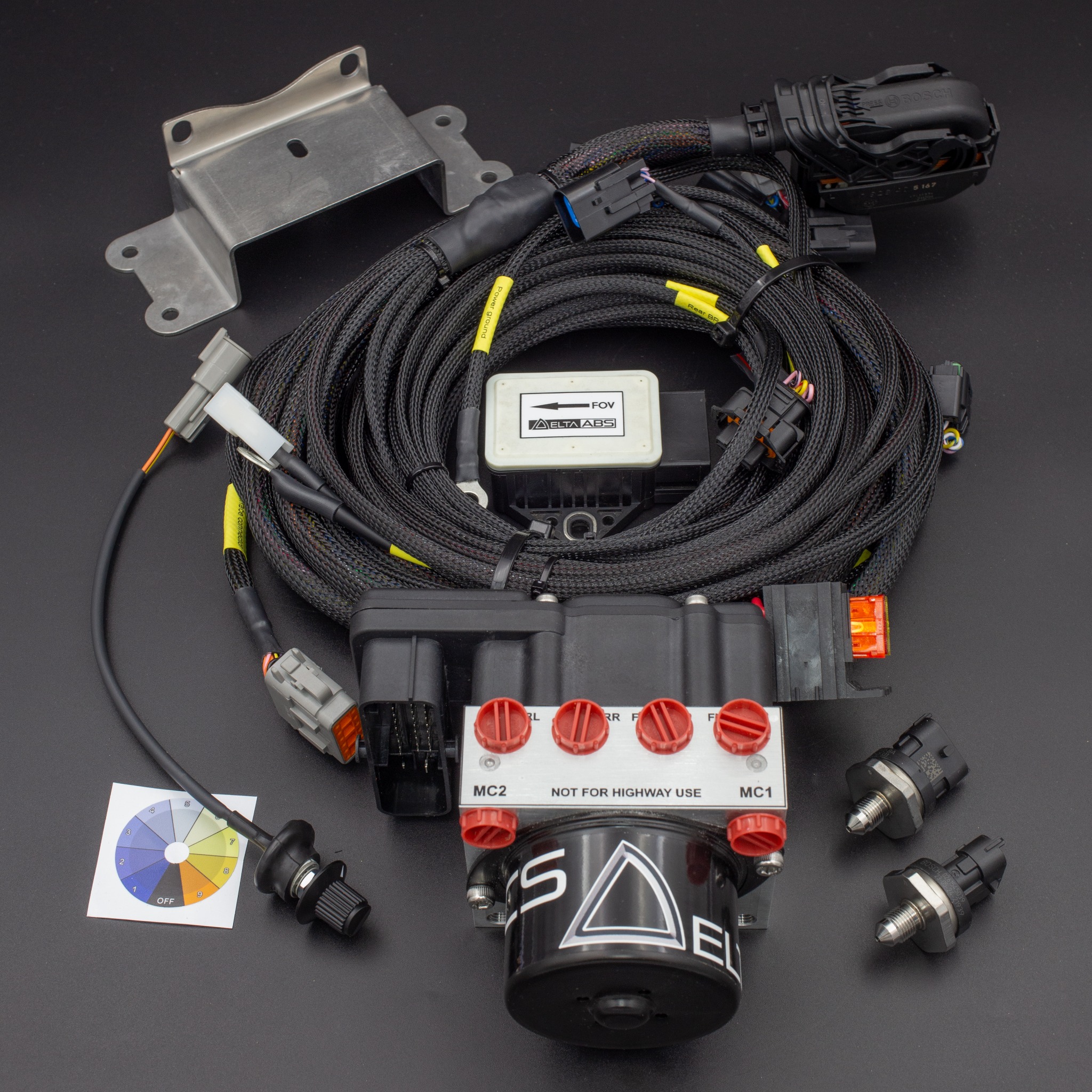
- ABS hydraulic control unit
- HCU mounting bracket
- Wiring loom
- Yaw rate sensor (IMU)
- Slip level switch
- Master cylinder pressure sensors (two supplied)
The kit consists of eight main elements as detailed below, with the HCU mounting bracket also included. The numbers above identify the components visible in the photograph. The wheel-speed sensors, ABS ON/OFF switch and ABS fault light are not pictured.
ABS Hydraulic Control Unit (1)
In this second-generation version of the Delta ABS, the modulator and electronic control hardware is integrated into the same hydraulic control unit (HCU). Connection to the loom is made via a 38-pin connector. This unit processes all the system’s electronic signalling in addition to driving the integrated hydraulic unit and fault indicator light. This is an eight-solenoid hydraulic control unit supplying two separate ABS braking circuits, one to the front wheels and one to the rear wheels. There are two master cylinder input ports (MC1 and MC2) and four output ports to the wheel brake calipers. All hydraulic fittings are M10 × 1 mm. The unit includes an internal fluid return pump driven by an integrated DC motor. External sensors are supplied to monitor master cylinder pressures. A mounting bracket (2) for the HCU, with two M8x1mm bolts to suit, is included in the kit.
Wiring Loom (3)
The wiring loom is terminated with all necessary connectors to complete system installation. All connectors are terminated with the length necessary for installation even in larger vehicles or your specified lengths if you have ordered a bespoke loom. The exact measurements of the generic loom are detailed in Figure 11.
Wheel Speed Sensors
The Delta ABS system functions with two wire Hall Effect (active) sensors only. These can be either your vehicle’s existing two wire hall sensors (if compatible), or the two wire Hall Effect sensors (magnetic type) supplied with the kit. VR (passive) sensors are not supported.
Hall Sensors (supplied with kit)
The kit includes four Hall Effect sensors. These are the two-wire Hall Effect magnetic type and can be used with an ABS coded ring (a smooth ABS ring with magnetic strips encased) or a toothed ferromagnetic wheel.
Hall Sensors (vehicle’s existing sensors)
If you wish to use your own two-wire Hall Effect sensors (because they are captive in a bearing pack for example), then you will need to cut the two wires that come from your existing ABS sensors and fit the Delta ABS 2 pin connector in order to connect to the Delta ABS loom.
Yaw Rate Sensor (IMU) (4)
The inertial measurement unit (IMU) communicates with the Delta ABS ECU over CAN. Its sensor characteristics are listed in the Technical Data Sheet. Yaw rate and yaw acceleration are available on CAN through the user-defined CAN outputs; see the CAN Export Data List for their scaling.
Slip Level Switch (5)
Ten position rotary switch. To be fitted in the cockpit and used by the driver to estimate the available surface friction. This setting is used by the ABS ECU to control slip rate for maximum braking performance.
ABS On/Off Switch
This toggle switch should be fitted in the cockpit. Turning this switch to the off position will turn off supply current to the internal ABS module solenoids.
ABS Fault Light
To be fitted in the cockpit and indicates the ABS ECU has detected a fault or that the system is switched off for any reason.
Master Cylinder Pressure Sensors (6)
These are fitted in the lines between the master cylinder and the hydraulic control unit. Two sensors are supplied with the kit. This is a 3-pin sensor with a 10mm x 1mm thread and will require a T-piece to be installed (see installation section). The second pressure sensor is optional and may be fitted to the rear hydraulic circuit if brake bias measurement is required.
(Optional) USB-CAN Interface
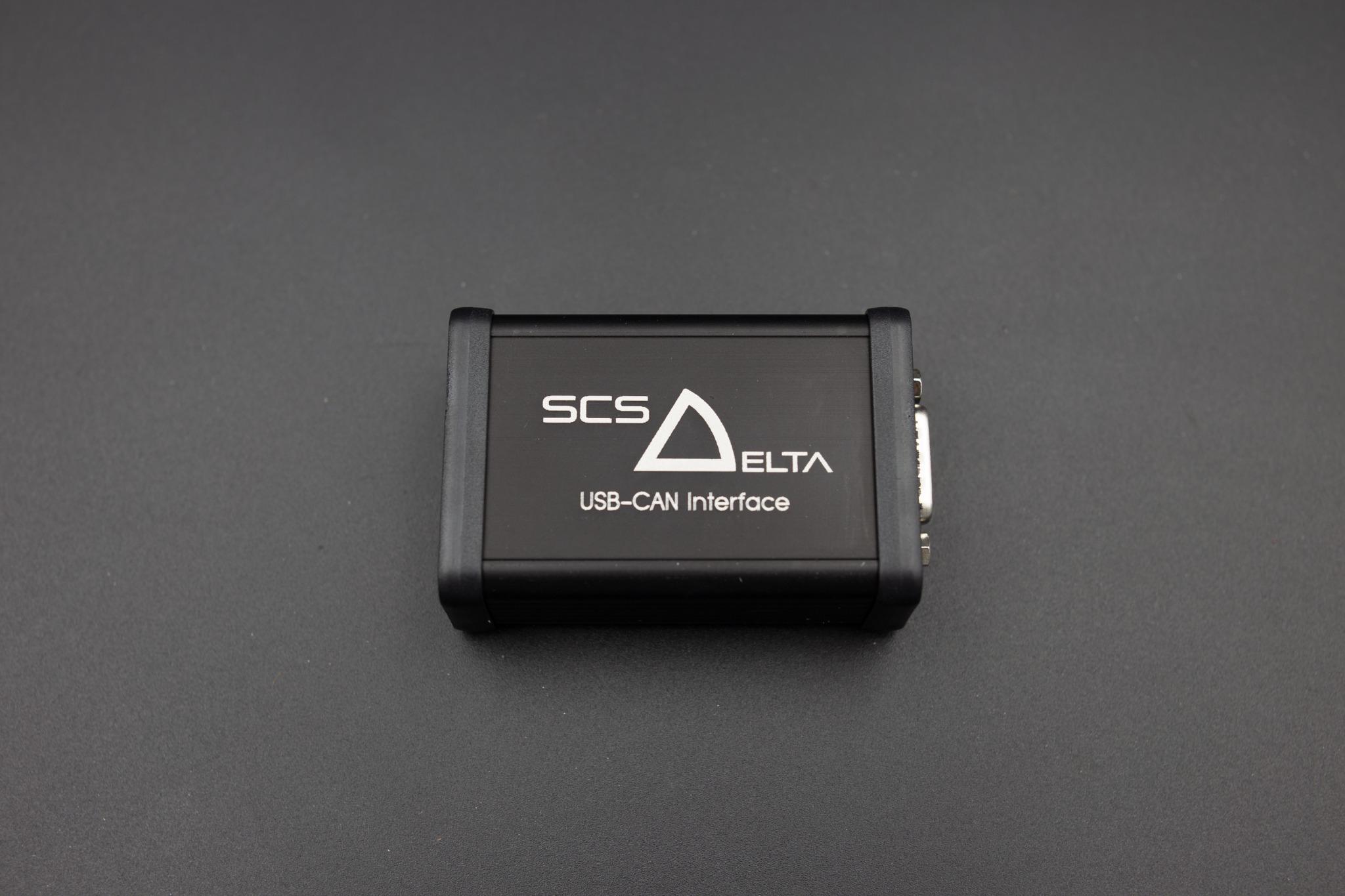
The CAN bus to USB interface is connected between your PC and the ABS ECU. It allows you to access important data and functions such as the ABS bleeding process.
Installation
Follow the Installation Guide for the complete installation procedure, component fitting instructions, software checks and ABS bleeding sequence.
Using the Installed System
Check the Fault Light First
| Condition | Switch | Lamp |
|---|---|---|
| Startup test | ON | ON for about 2 seconds, then OFF if no current fault |
| ABS ready | ON | OFF |
| ABS switched off | OFF | ON |
| Active confirmed fault | ON | ON |
| Stored fault only | ON | OFF |
The fault light is used to indicate that a fault has occurred in the system. This could be any type of fault, for example loss of signal from a wheel speed sensor. If the fault light itself has failed then it will be unable to indicate a fault and the driver may assume there is no fault when there is and will therefore be unaware that ABS will not be available when required. For this reason, it is essential that the fault light is checked each time before the vehicle is used. This can be checked by observing that the bulb illuminates for approximately two seconds when the system is switched on.
Choosing the Slip Switch Position
The slip switch allows the driver to indicate to the system the level of grip available on the surface of the race track. This will determine the level to which the ABS system will intervene in braking. This allows for the maximum amount of deceleration whilst controlling and preventing wheel lock and instability.
The switch has positions from 1 to 9 with 1 to indicate less grip on the surface and 9 to indicate the highest level of grip. The correct level to use can be ascertained by the driver and should give the preferred compromise of braking deceleration performance to vehicle stability which the driver can comfortably drive with in a race situation. Each car is different and so the system should be tested under different track conditions to learn optimum settings for the car and levels of surface grip.
Please note that OFF is position 10. If the switch is not orientated correctly with the sticker, you must slacken the retaining nut before attempting to rotate it. An attempt to rotate the switch without loosening may cause damage the switch and this abuse is not covered by our warranty.
Turning ABS Off
Should the driver want to stop the ABS system intervening at all and return normal braking the ABS Off switch can be used. ABS will return when the toggle switch is returned to the on position.
Dealing with a One-Off fault
Any confirmed fault disables ABS immediately and commands the warning lamp on.
A fault remains saved under Current Faults until the system is powered off and on again or the ABS ON/OFF switch is cycled. Either action clears all current faults. If a fault condition persists, the fault will be set in Current Faults again. Never cycle the ABS switch while braking. Check the underlying cause and the warning-lamp state before returning to ABS operation. The fault history remains under Stored Faults until cleared in DeltaABS software.
Viewing Current Faults and Stored Faults
Faults can be viewed using DeltaABS on the page Calibration – Diagnostics - Diagnostics Variables. The faults are split into two categories, Current Faults and Stored Faults. A fault remains saved under Current Faults until the system is powered off and on again or the ABS ON/OFF switch is cycled. At this point, all current faults are cleared. If a fault condition persists, the fault will be set in Current Faults again. If the fault condition is no longer present, the fault remains visible only in Stored Faults. Stored faults remain saved until the Clear Stored Faults button is pressed.
Fault diagnosis
A confirmed fault disables ABS immediately and commands the warning lamp on. A lamp or circuit fault can prevent it from illuminating, so verify the startup lamp test. All wheel-speed sensor and wheel-speed signal plausibility faults have an exact 10-second confirmation period. Confirmation time for other fault types varies by fault.
| Fault | Likely cause | System response | Recommended check |
|---|---|---|---|
| 1. Left Rear Inlet Solenoid Fault | Fault internal to the ABS unit | ABS off; warning lamp on | Clear the fault and test again. Verify supply voltage and all grounds. If the fault persists, contact SCS Delta technical support. |
| 2. Left Rear Outlet Solenoid Fault | Fault internal to the ABS unit | ABS off; warning lamp on | Clear the fault and test again. Verify supply voltage and all grounds. If the fault persists, contact SCS Delta technical support. |
| 3. Right Rear Inlet Solenoid Fault | Fault internal to the ABS unit | ABS off; warning lamp on | Clear the fault and test again. Verify supply voltage and all grounds. If the fault persists, contact SCS Delta technical support. |
| 4. Right Rear Outlet Solenoid Fault | Fault internal to the ABS unit | ABS off; warning lamp on | Clear the fault and test again. Verify supply voltage and all grounds. If the fault persists, contact SCS Delta technical support. |
| 5. Left Front Inlet Solenoid Fault | Fault internal to the ABS unit | ABS off; warning lamp on | Clear the fault and test again. Verify supply voltage and all grounds. If the fault persists, contact SCS Delta technical support. |
| 6. Left Front Outlet Solenoid Fault | Fault internal to the ABS unit | ABS off; warning lamp on | Clear the fault and test again. Verify supply voltage and all grounds. If the fault persists, contact SCS Delta technical support. |
| 7. Right Front Inlet Solenoid Fault | Fault internal to the ABS unit | ABS off; warning lamp on | Clear the fault and test again. Verify supply voltage and all grounds. If the fault persists, contact SCS Delta technical support. |
| 8. Right Front Outlet Solenoid Fault | Fault internal to the ABS unit | ABS off; warning lamp on | Clear the fault and test again. Verify supply voltage and all grounds. If the fault persists, contact SCS Delta technical support. |
| 9. Solenoid Supply Voltage Fault | Insufficient voltage at the solenoids for operation | ABS off; warning lamp on | Check the solenoid fuse and wiring. |
| 10. Sensor Supply Reference Voltage Fault | The 5 V sensor supply is outside its correct range | ABS off; warning lamp on | Disconnect all pressure sensors and the slip switch, then check the fault again. Test the wiring for short circuits or chafing. |
| 11. ABS Pressure Pump Voltage Supply Fault | Insufficient voltage at the pump for operation | ABS off; warning lamp on | Check the pump fuse and wiring. |
| 12. Malfunction Indicator Lamp Fault | Warning lamp bulb or circuit fault | ABS off; lamp commanded on (lamp or circuit may prevent illumination) | Check the bulb and wiring for damage. One side of the lamp should receive a 12 V supply through the harness. |
| 13. ABS Pressure Pump Relay Fault | Pump relay or its circuit is open or shorted as measured by the ABS unit | ABS off; warning lamp on | Check and, if necessary, replace the relay. Check its circuit for an open or short. |
| 14. System Battery Voltage Too Low | Supply voltage below 8 V | ABS off; warning lamp on | Check the supply and wiring. Continuous operating voltage must be 9–16 V. |
| 15. System Battery Voltage Too High | Supply voltage above 17 V | ABS off; warning lamp on | Check the supply and charging system. Continuous operating voltage must be 9–16 V. |
| 16. Front Brake Pressure Sensor Signal Low | Front pressure sensor signal shorted to ground | ABS off; warning lamp on | Check the wiring and replace the sensor. Ensure that water has not entered the sensor. |
| 17. Front Brake Pressure Sensor Signal High | Front pressure sensor signal shorted to 5 V or open circuit | ABS off; warning lamp on | Check that the sensor is connected and inspect the wiring. If wiring is sound, replace the sensor. |
| 18. Rear Brake Pressure Sensor Signal Low | Rear pressure sensor signal shorted to ground | ABS off; warning lamp on | Check the wiring and replace the sensor. Ensure that water has not entered the sensor. |
| 19. Rear Brake Pressure Sensor Signal High | Rear pressure sensor signal shorted to 5 V or open circuit | ABS off; warning lamp on | Check that the sensor is connected and inspect the wiring. If wiring is sound, replace the sensor. |
| 20. Yaw Rate Sensor Fault | No or incorrect CAN data received from the yaw rate sensor; an interruption, short or device with the wrong baud rate on the communications connector is a common cause | ABS off; warning lamp on | Check that the yaw rate sensor is connected. Check whether the USB-CAN interface can connect the PC to the ABS unit correctly; inspect the CAN connection and other devices. |
| 21. Slip Select Switch Fault | Damaged or incorrectly connected physical slip switch, often caused by rotating past its end stop; alternatively, a CAN slip-position message that does not match the required specification exactly | ABS off; warning lamp on | For a physical switch, inspect the switch and wiring and compare every position with the software reading. If the label is misaligned, loosen the retaining nut before repositioning the switch or move the label; never turn the switch using the knob to align it. Replace a damaged switch. For CAN control, verify the entire message against the current specification and DBC. |
| 22. Left Rear Wheel Speed Sensor Fault | Wheel-speed sensor electrical circuit fault, or a missing signal detected by comparison with the other wheel speeds | ABS off; warning lamp on | Check the sensor and its wiring, including connections and signal continuity. |
| 23. Right Rear Wheel Speed Sensor Fault | Wheel-speed sensor electrical circuit fault, or a missing signal detected by comparison with the other wheel speeds | ABS off; warning lamp on | Check the sensor and its wiring, including connections and signal continuity. |
| 24. Left Front Wheel Speed Sensor Fault | Wheel-speed sensor electrical circuit fault, or a missing signal detected by comparison with the other wheel speeds | ABS off; warning lamp on | Check the sensor and its wiring, including connections and signal continuity. |
| 25. Right Front Wheel Speed Sensor Fault | Wheel-speed sensor electrical circuit fault, or a missing signal detected by comparison with the other wheel speeds | ABS off; warning lamp on | Check the sensor and its wiring, including connections and signal continuity. |
| 26. Left Rear Speed Signal Plausibility Fault | Firmware V2 onward: implausible wheel-speed trigger pulses | ABS off; warning lamp on | Inspect the trigger wheel for damage, vibration or wobble. Check the sensor mounting position and that it is secure. |
| 27. Right Rear Speed Signal Plausibility Fault | Firmware V2 onward: implausible wheel-speed trigger pulses | ABS off; warning lamp on | Inspect the trigger wheel for damage, vibration or wobble. Check the sensor mounting position and that it is secure. |
| 28. Left Front Speed Signal Plausibility Fault | Firmware V2 onward: implausible wheel-speed trigger pulses | ABS off; warning lamp on | Inspect the trigger wheel for damage, vibration or wobble. Check the sensor mounting position and that it is secure. |
| 29. Right Front Speed Signal Plausibility Fault | Firmware V2 onward: implausible wheel-speed trigger pulses | ABS off; warning lamp on | Inspect the trigger wheel for damage, vibration or wobble. Check the sensor mounting position and that it is secure. |
Data Logging
Onboard logging
Delta ABS supports onboard logging. See the Onboard Logging Guide (opens in a new tab) for the dedicated operating instructions.
PC and external CAN logging
Data may also be logged using DeltaABS on a connected PC or an external CAN logger, ECU or dashboard on the public CAN connection. Use the current DBC from the SCS Delta File Repository. Recommended channels include all four wheel speeds, front pressure, rear pressure if fitted, slip position, ABS status/intervention, pump status, fault status, supply voltage and longitudinal/lateral acceleration.
Technical Information
See the Technical Data Sheet for the ABS main unit pin-out, sensor characteristics, weights and electrical specifications.
Auxiliary Connector DTM06-12S Pin-out
| Pin 1 - Black | Ground |
|---|---|
| Pin 2 – Yellow/Black | CAN Low (Not fitted with termination resistor) |
| Pin 3 – Black/Yellow | CAN High (Not fitted with termination resistor) |
| Pin 4 – Brown/Red | ABS Active Output (0.75A Open Collector) |
| Pin 5 – Brown/Yellow | Brake Light Output (0.5 A max, open collector; 2 bar ON / 1 bar OFF) |
| Pin 6 – Green/Purple | Speedometer Output (0.75A Open Collector) |
| Pin 7 – Orange/Pink | Front Left Wheel Speed Output (0.75A Open Collector) |
| Pin 8 – Orange/Blue | Front Right Wheel Speed Output (0.75A Open Collector) |
| Pin 9 – Orange/Red | Rear Left Wheel Speed Output (0.75A Open Collector) |
| Pin 10 – Orange/Green | Rear Right Wheel Speed Output (0.75A Open Collector) |
| Pin 11 – Empty | Not Used |
| Pin 12 – White/Red | Ignition-switched 12 V output for external devices, e.g. data loggers; 5 A maximum; do not use as an ABS power input |
Auxiliary connector pin 12 supplies ignition-switched 12 V power for external devices. The maximum permitted output current is 5 A. This output must not be used to power the ABS system.
CAN Export Data List
The data shown in the table below is broadcast on the public CAN bus at the auxiliary connector, for use by external ECUs, dashboards and data loggers etc. The baud rate of this CAN bus can be set in the DeltaABS software to either 500kb/s or 1Mbit/s.
| CAN ID | Name | Description | Unit | Type | Start bit | Bits | Rate | Scaling / range |
|---|---|---|---|---|---|---|---|---|
| 560h | Diag_ABSUnit | Hydraulic unit fault | Unsigned | 0 | 1 | 100 Hz | 0 = OK; 1 = fault | |
| Diag_FuseValve | ABS valve fuse or power-supply fault | Unsigned | 1 | 1 | 100 Hz | 0 = OK; 1 = fault | ||
| Diag_FusePump | ABS pump fuse or power-supply fault | Unsigned | 2 | 1 | 100 Hz | 0 = OK; 1 = fault | ||
| Diag_P_FA | Front pressure sensor fault | Unsigned | 3 | 1 | 100 Hz | 0 = OK; 1 = fault | ||
| Diag_P_RA | Rear pressure sensor fault | Unsigned | 4 | 1 | 100 Hz | 0 = OK; 1 = fault | ||
| Diag_YRS | Yaw rate sensor fault | Unsigned | 5 | 1 | 100 Hz | 0 = OK; 1 = fault | ||
| ABS_fault_info | Stored fault status, including minor faults that do not disable ABS | Unsigned | 6 | 2 | 100 Hz | 0 = no stored faults; 1 = inactive faults stored; 2 = active faults stored; 3 = not explicitly defined in DBC | ||
| Brake_bal_at50 | Calculated rear brake pressure when front pressure is 50 bar | bar | Unsigned | 8 | 8 | 100 Hz | 1 bar/bit; offset 0 bar; range 0–60 bar | |
| Brake_bal_at50_advice | Recommended rear brake pressure when front pressure is 50 bar | bar | Unsigned | 16 | 8 | 100 Hz | 1 bar/bit; offset 0 bar; range 0–60 bar | |
| Brake_bal_proc | Measured brake balance on the front axle | % | Unsigned | 24 | 8 | 100 Hz | 1 %/bit; offset 0 %; range 0–100 % | |
| Brake_bal_proc_advice | Recommended brake balance on the front axle | % | Unsigned | 32 | 8 | 100 Hz | 1 %/bit; offset 0 %; range 0–100 % | |
| Diag_FL | Front left wheel-speed sensor diagnostics | Unsigned | 40 | 2 | 100 Hz | 0 = OK; 1 = wiring fault; 2 = signal fault; 3 = not defined in DBC | ||
| Diag_FR | Front right wheel-speed sensor diagnostics | Unsigned | 42 | 2 | 100 Hz | 0 = OK; 1 = wiring fault; 2 = signal fault; 3 = not defined in DBC | ||
| Diag_RL | Rear left wheel-speed sensor diagnostics | Unsigned | 44 | 2 | 100 Hz | 0 = OK; 1 = wiring fault; 2 = signal fault; 3 = not defined in DBC | ||
| Diag_RR | Rear right wheel-speed sensor diagnostics | Unsigned | 46 | 2 | 100 Hz | 0 = OK; 1 = wiring fault; 2 = signal fault; 3 = not defined in DBC | ||
| WheelQuality_FL | Front left trigger-wheel quality | Unsigned | 48 | 1 | 100 Hz | 0 = OK; 1 = fault | ||
| WheelQuality_FR | Front right trigger-wheel quality | Unsigned | 49 | 1 | 100 Hz | 0 = OK; 1 = fault | ||
| WheelQuality_RL | Rear left trigger-wheel quality | Unsigned | 50 | 1 | 100 Hz | 0 = OK; 1 = fault | ||
| WheelQuality_RR | Rear right trigger-wheel quality | Unsigned | 51 | 1 | 100 Hz | 0 = OK; 1 = fault | ||
| 5C0h | SwitchPosition | Slip switch position | Unsigned | 0 | 8 | 100 Hz | 1/bit; offset 0; range 1–10 | |
| BrakeP_Front | Front brake pressure | bar | Unsigned | 8 | 8 | 100 Hz | 1 bar/bit; offset 0 bar; range 0–255 bar | |
| BrakeP_Rear | Rear brake pressure | bar | Unsigned | 16 | 8 | 100 Hz | 1 bar/bit; offset 0 bar; range 0–255 bar | |
| BLS | Brake light switch status | Unsigned | 24 | 1 | 100 Hz | 0 = inactive; 1 = active | ||
| ABS_Malfunction | ABS control deactivated by a fault | Unsigned | 28 | 1 | 100 Hz | 0 = inactive; 1 = active | ||
| ABS_Active | ABS control active | Unsigned | 29 | 1 | 100 Hz | 0 = inactive; 1 = active | ||
| EBD_Active | Electronic brake-force distribution control active | Unsigned | 30 | 1 | 100 Hz | 0 = inactive; 1 = active | ||
| ABS_Lamp | ABS disabled by a fault, switch OFF or operation with DeltaABS software | Unsigned | 31 | 1 | 100 Hz | 0 = inactive; 1 = active | ||
| AX1 | Longitudinal acceleration used by ABS | g | Unsigned | 32 | 16 | 100 Hz | 0.00012742 g/bit; offset -4.1768 g; range -4.1768–4.17367 g | |
| AY1 | Lateral acceleration used by ABS | g | Unsigned | 48 | 16 | 100 Hz | 0.00012742 g/bit; offset -4.1768 g; range -4.1768–4.1765 g | |
| 24Ah | FrontLeftSpd | Front left wheel speed | m/s | Unsigned | 0 | 16 | 100 Hz | 0.015625 m/s/bit; offset 0 m/s; range 0–100 m/s |
| FrontRightSpd | Front right wheel speed | m/s | Unsigned | 16 | 16 | 100 Hz | 0.015625 m/s/bit; offset 0 m/s; range 0–100 m/s | |
| RearLeftSpd | Rear left wheel speed | m/s | Unsigned | 32 | 16 | 100 Hz | 0.015625 m/s/bit; offset 0 m/s; range 0–100 m/s | |
| RearRightSpd | Rear right wheel speed | m/s | Unsigned | 48 | 16 | 100 Hz | 0.015625 m/s/bit; offset 0 m/s; range 0–100 m/s |
Signal names, bit positions, scaling and ranges follow the supplied SCS Delta ABS DBC (Version 3.0). All three messages use standard 11-bit CAN identifiers, 8-byte payloads and little-endian (Intel) signal encoding. Physical value = raw value × factor + offset. The 100 Hz update rate is retained from the manual; the DBC does not specify message timing.
As an alternative to the supplied physical slip position switch, slip switch position can be received via CAN as detailed in the table below. NB only one switch can be used at any one time, physical or CAN not both. If invalid data is received over CAN then a slip switch fault will be set and ABS operation disabled.
| CAN ID | Name | Description | Data type | Start bit | Bits | Minimum update rate | Valid range |
|---|---|---|---|---|---|---|---|
| 24Ch | Switch_Pos | Slip switch position | Unsigned | 0 | 8 | 5 Hz | 1–10 |
User Defined CAN Outputs can also be configured in DeltaABS software at the configured CAN IDs and update frequencies according to the table below:
Yaw rate and yaw acceleration are available through the user-defined CAN outputs listed below. Configure their CAN IDs and update frequencies in DeltaABS software. Yaw rate uses 0.01 °/s/bit and yaw acceleration uses 0.125 °/s²/bit, both as signed 16-bit values with the most significant byte first. The supplied DBC describes the fixed CAN outputs; the yaw channels use the separately configured user-defined outputs.
| Name | Description | Unit | Data type | Position | Scaling |
|---|---|---|---|---|---|
| Left Rear Wheel Speed | Left rear wheel speed | km/h | Unsigned short | Byte 0 MSB; byte 1 LSB | 0.01 km/h/bit |
| Right Rear Wheel Speed | Right rear wheel speed | km/h | Unsigned short | Byte 0 MSB; byte 1 LSB | 0.01 km/h/bit |
| Left Front Wheel Speed | Left front wheel speed | km/h | Unsigned short | Byte 0 MSB; byte 1 LSB | 0.01 km/h/bit |
| Right Front Wheel Speed | Right front wheel speed | km/h | Unsigned short | Byte 0 MSB; byte 1 LSB | 0.01 km/h/bit |
| Front Brake Pressure | Front brake master cylinder pressure | bar | Unsigned short | Byte 0 MSB; byte 1 LSB | 0.1 bar/bit |
| Rear Brake Pressure | Rear brake master cylinder pressure | bar | Unsigned short | Byte 0 MSB; byte 1 LSB | 0.1 bar/bit |
| Brake Bias | Measured brake bias percentage | % | Unsigned char | Byte 1 | 1 %/bit |
| ABS Status | ABS status bits | Unsigned char | Byte 1 | See status bits below | |
| Lateral Acceleration | Measured lateral acceleration from IMU | m/s² | Signed short | Byte 0 MSB; byte 1 LSB | 0.01 m/s²/bit |
| Longitudinal Acceleration | Measured longitudinal acceleration from IMU | m/s² | Signed short | Byte 0 MSB; byte 1 LSB | 0.01 m/s²/bit |
| Yaw Acceleration | Measured yaw acceleration from IMU | °/s² | Signed short | Byte 0 MSB; byte 1 LSB | 0.125 °/s²/bit |
| Yaw Rate | Measured yaw rate from IMU | °/s | Signed short | Byte 0 MSB; byte 1 LSB | 0.01 °/s/bit |
| Slip Position | Slip switch position | Unsigned char | Byte 1 | Valid 1–10 | |
| Input Diagnostics | Diagnostic value for input sensor status | Unsigned short | Byte 0 MSB; byte 1 LSB | See input bits below | |
| Output Diagnostics | Diagnostic value for actuator outputs | Unsigned short | Byte 0 MSB; byte 1 LSB | See output bits below | |
| Brake Bias at 50 | Brake bias pressure at 50 bar | bar | Unsigned char | Byte 0 | 1 bar/bit |
| CAN 1 Rx Err, Tx Err | CAN bus 1 receive and transmit errors | Unsigned char | Byte 0 Rx; byte 1 Tx | 1 error/bit | |
| CAN 2 Rx Err, Tx Err | CAN bus 2 receive and transmit errors | Unsigned char | Byte 0 Rx; byte 1 Tx | 1 error/bit | |
| CAN 1 Status, CAN 2 Status | CAN bus 1 and bus 2 status | Unsigned char | Byte 0 CAN 1; byte 1 CAN 2 | — | |
| ECU Temperature | ECU core temperature | °C | Signed short | Byte 0 MSB; byte 1 LSB | 1 °C/bit |
| Bit | Meaning |
|---|---|
| 0 | Brakes on |
| 1 | ABS intervention active |
| 2 | ABS fault |
| 3 | ABS off |
| 4 | ABS pump active |
| 5 | ABS test mode active |
| 6 | ABS system ready |
| 7 | ABS warning lamp |
| Bit | Meaning |
|---|---|
| 0 | Supply voltage low |
| 1 | Supply voltage high |
| 2 | Front brake pressure sensor input voltage low |
| 3 | Front brake pressure sensor input voltage high |
| 4 | Rear brake pressure sensor input voltage low |
| 5 | Rear brake pressure sensor input voltage high |
| 6 | Yaw rate (IMU) sensor fault |
| 7 | Slip switch fault |
| 8 | Left rear wheel-speed sensor open circuit |
| 9 | Right rear wheel-speed sensor open circuit |
| 10 | Left front wheel-speed sensor open circuit |
| 11 | Right front wheel-speed sensor open circuit |
| 12 | Left rear wheel-speed sensor fault |
| 13 | Right rear wheel-speed sensor fault |
| 14 | Left front wheel-speed sensor fault |
| 15 | Right front wheel-speed sensor fault |
| Bit | Meaning |
|---|---|
| 0 | Left rear hold solenoid fault |
| 1 | Left rear drop solenoid fault |
| 2 | Right rear hold solenoid fault |
| 3 | Right rear drop solenoid fault |
| 4 | Left front hold solenoid fault |
| 5 | Left front drop solenoid fault |
| 6 | Right front hold solenoid fault |
| 7 | Right front drop solenoid fault |
| 8 | Solenoid supply voltage fault |
| 9 | Sensor supply voltage fault |
| 10 | Warning lamp output fault |
| 11 | Pump output fault |
| 12 | Pump supply voltage fault |
| 13–15 | Not used |
Typical CAN bus outputs
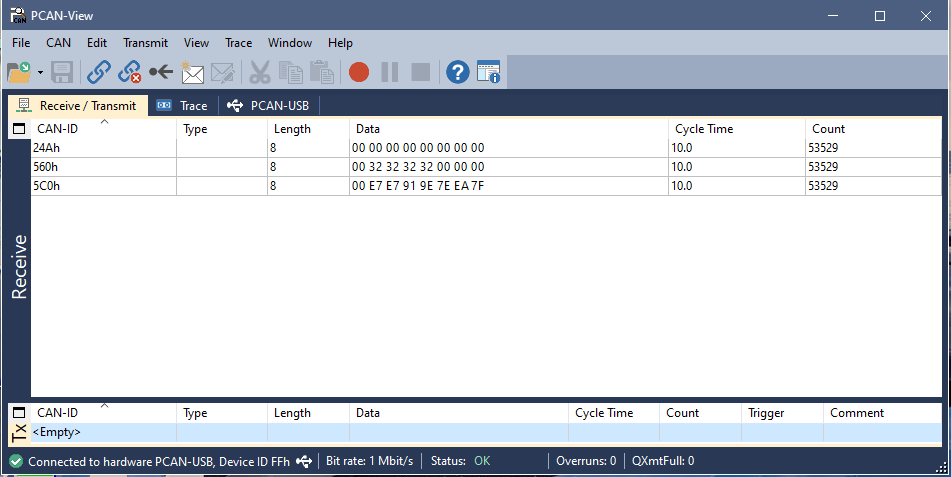
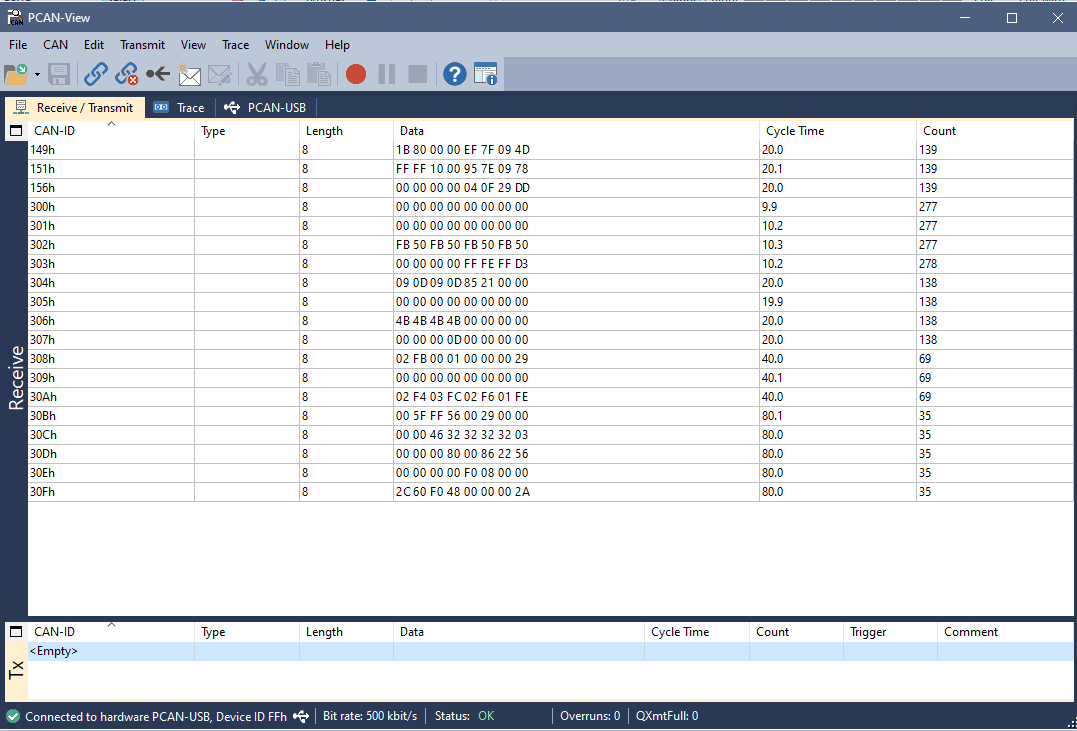
The screenshots below show typical messages observed in PCAN-View on the public and private CAN buses.
CAN 2 — Public CAN bus
CAN 1 — Private CAN bus
Customer Provided Vehicle Data
| Description | Value | Example | Unit | Guidance |
|---|---|---|---|---|
| Customer name | ||||
| Vehicle make/model | ||||
| Wheel circumference — front | 2010 | mm | Move the vehicle exactly 10 wheel revolutions, measure the distance and divide by 10. | |
| Wheel circumference — rear | 2160 | mm | Move the vehicle exactly 10 wheel revolutions, measure the distance and divide by 10. | |
| Encoder teeth — front | 48 | teeth | Recommended minimum: 40. | |
| Encoder teeth — rear | 48 | teeth | Recommended minimum: 40. | |
| Wheel-speed sensor type | HE | HE: Hall effect; MHE: magnetic Hall effect. Confirm sensor and trigger-ring compatibility. | ||
| Vehicle weight | 1200 | kg | Include the driver and half a tank of fuel. | |
| Front wheel and tyre weight | 22 | kg | Mass of one front wheel and tyre. | |
| Rear wheel and tyre weight | 23 | kg | Mass of one rear wheel and tyre. | |
| Wheelbase | 2765 | mm | Centre of front axle to centre of rear axle. | |
| Front track | 1675 | mm | Middle of left tyre to middle of right tyre on the front axle. | |
| Rear track | 1712 | mm | Middle of left tyre to middle of right tyre on the rear axle. | |
| Drive mode | FWD | FWD, RWD or AWD. | ||
| Auxiliary output | SPD | BLS: brake light; SPD: speedometer. | ||
| Speedometer output frequency at 300 km/h | 2000 | Hz | Complete if SPD is selected. | |
| CAN communication speed | 1 Mbit/s | Choose 500 kbit/s or 1 Mbit/s to match the vehicle. |