Follow these stages in order. The installation procedures, component drawings, software checks and complete bleeding sequence are included below. Record each result for the vehicle.
1. Preparation and vehicle requirements
Confirm the vehicle is for motorsport use and has two hydraulic circuits, front and rear.
Identify master cylinder sizes, existing pedal travel, hydraulic line routing, wheel trigger rings and available mounting positions. Master-cylinder sizing is vehicle-specific.
Confirm supply remains within 9–16 V under all operating conditions, including pump operation.
Check the hydraulic pressure design: typical ABS operation is 25–65 bar, with an upper operating limit of 100 bar. ABS response may be compromised from 100 to 115 bar and will not operate correctly above 115 bar. The unit is safe from hydraulic damage up to 200 bar.
2. System layout and placement
Plan hydraulic unit, loom, wheel sensors, pressure sensor(s), IMU, driver switch and warning lamp locations.
Mount the IMU level near vehicle centre with its connector facing directly rearward. Maximum permitted angular deviation from the optimum orientation is ±5°.
Make the ABS OFF switch accessible and the warning lamp visible to the driver.
Yaw Rate Sensor
Figure 1: Delta ABS IMU and forward direction marking
Sensor position in the car: The sensor should be
mounted on the floor of the vehicle as close to the centre as possible,
preferably at the centre of gravity. The centre can be found by
considering a line drawn between the front left and rear right wheel and
another line between the front right and rear left wheel. Where these
lines intersect is the optimum point for placing the sensor. In any
case, the point chosen should be the same distance from the left and
right side of the vehicle.
Sensor orientation: The Sensor should be mounted
such that connector faces directly towards the centre of the rear of the
car. A separate mounting plate (not included) used for damping vibration
can be installed if necessary. The sensor should also be mounted level
(e.g. all its sides are the same distance from the ground). See Figure 2
below for dimensions.
Figure 2: Yaw Rate Sensor (IMU) Dimensions
3. Hydraulic installation
Use the hydraulic unit, master cylinder and pressure sensor instructions below. Verify every master cylinder and caliper port. Front pressure sensing is required by the original procedure; rear sensing is optional for brake bias measurement. With no rear sensor, the rear input reads maximum pressure and calculated bias goes to maximum rear bias; ignore both values.
Master Cylinder Upgrade
Master-cylinder sizing depends on the vehicle's existing braking system and driver preference; a universal size increase cannot be prescribed. Assess pedal travel and available fluid displacement on the individual vehicle.
Adding the ABS modulator increases the fluid volume required during intervention because the accumulators take additional fluid to fill. A system that already has substantial pedal travel before ABS is fitted may run out of pedal travel before sufficient brake pressure is achieved. Validate pedal travel and attainable brake pressure during installation and progressive ABS testing. Select any master-cylinder change for the vehicle's hydraulic balance and desired pedal feel.
ABS Hydraulic Modulator
Control Unit
Figure 3: ABS hydraulic modulator control unit
The Hydraulic modulator has
two hydraulic input ports (10mm dia. 1mm pitch), one each for the front
and rear axles, and four output ports (10mm dia. 1mm pitch) for the four
wheels. The module does not come pre-filled with brake fluid. The
appropriate brake line connections are as labelled directly on the
modulator and can be seen in Figure 3.
There is no definite requirement to mount the ABS modulator in any
specific orientation, however we recommend that it is installed with the
4 brake line outlets facing upwards to make it easier to bleed air out
of the system.
The unit has a bracket attached using two M8 fine bolts. This bracket
can be used to fix the unit to the vehicle
Figure 4: ABS hydraulic control unit mounting bracket
Best advice is to use rigid metal brake lines in the braking circuits
as this will reduce the volume consumption when brakes are actuated.
Flexible lines should be kept to a minimum. Given the hydraulic unit
causes some vibration when actuating ABS, rigid brake lines should not
be secured to the vehicle too close to the hydraulic unit and should be
able to vibrate together with the unit for a short distance. This
reduces the chance of damage to the brake line. A distance of 20cm to
25cm is recommended.
Master Cylinder Brake
Pressure Sensors
The brake pressure sensors should be fitted between the master
cylinder and the hydraulic control unit by first installing a T-piece
with a 10mmx1mm female thread in the hydraulic line supplying the front
brake circuit and HCU port ‘MC1’. If brake bias measurement is required,
a second sensor of the same type (supplied) can be installed in the line
supplying the rear brake hydraulic circuit and HCU port ‘MC2’. The 3 pin
connectors for both sensors are labelled in the wiring loom. See Figure 5 for sensor dimensions. N.B. The
sensors are only sealed when the electrical connector is plugged in. If
left disconnected, water ingress can occur and damage the internal
electronics. This damage will not be covered under warranty.
Figure 5: Pressure Sensor
4. Wheel-speed sensors
For physical toothed wheels, use 40 teeth as the recommended minimum; up to 100 teeth has been tested. Set the supplied sensor air gap to 0.5–1 mm and follow the orientation drawings below. Orientation for magnetic coded rings is not specified. Air-gap and speed limits for other sensor types depend on the sensor.
The supplied wheel speed sensors are two wire Hall
Effect (active) types which work with either metal toothed ABS rings or
magnetic coded ABS rings. All four sensors need to be installed to avoid
the system going into a fault condition. Each sensor’s connector is
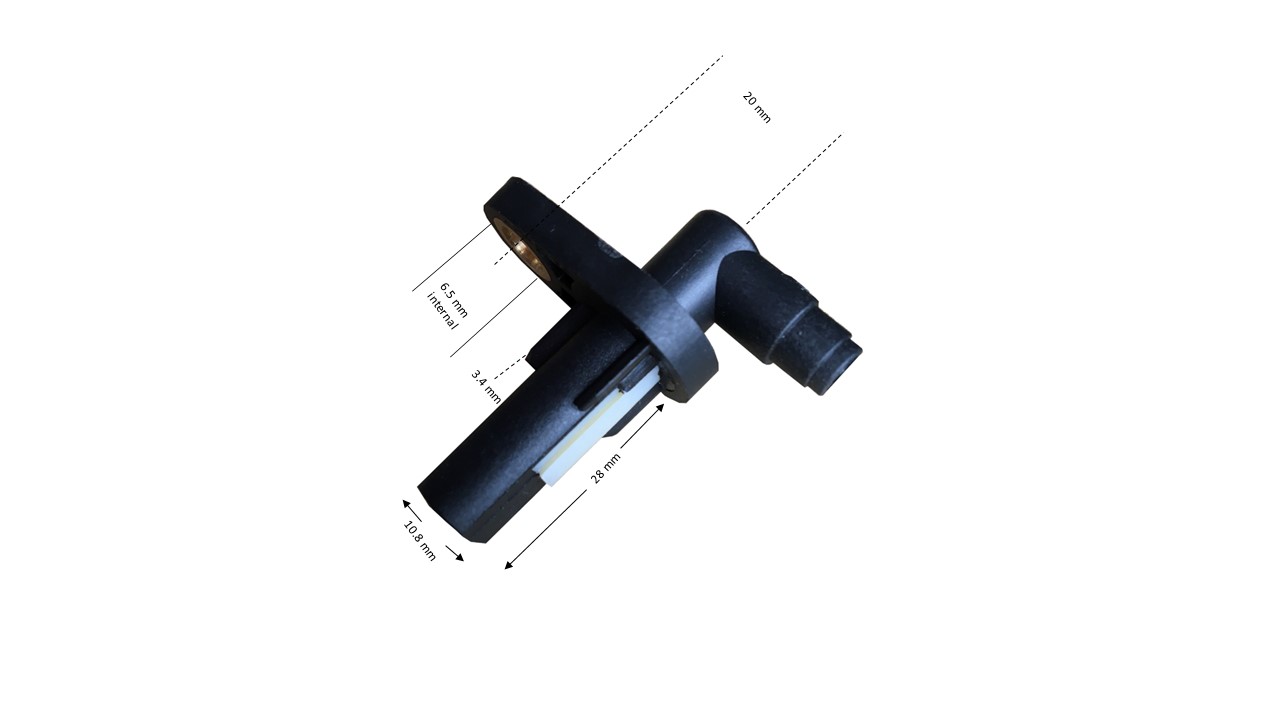
marked on the loom according to wheel. See Figure 6 for dimensions.
Figure 6: Wheel-speed sensor dimensions
If you have arranged
to use your own existing two wire Hall Effect sensors (if they
are integral to the wheel bearing pack for example) then the mating
connectors for the harness can be supplied, making sure that the sensor
connects between the control unit sensor input and ground. Take into
account that the ground wires for the wheel speed sensors are coloured
Slate/Trace on the loom. The negative terminal for your sensors will
therefore connect to Slate/Trace wire and the positive to the other wire
(different colour for each wheel). You can contact us for wiring
information if your sensor is not marked with polarity. Alternatively,
you can temporarily wire your female connector to the SCS ABS loom,
connect the sensor, and then spin the wheel while checking the wheel
speed value in DeltaABS and reverse the wires if you don’t get a value
(see Static verification below for the wheel-speed checks). Wire up securely once you have found signal and ground pins on
your connector.
NB Wheel speed sensors must
be of a standard two-wire Hall Effect type with a 7mA off, 14mA on
characteristic. Variable Reluctance and ‘intelligent’ active sensors are
not supported. Attempting to use other types of sensors may damage the
electronics of the ABS controller and this abuse is not
covered under the warranty.
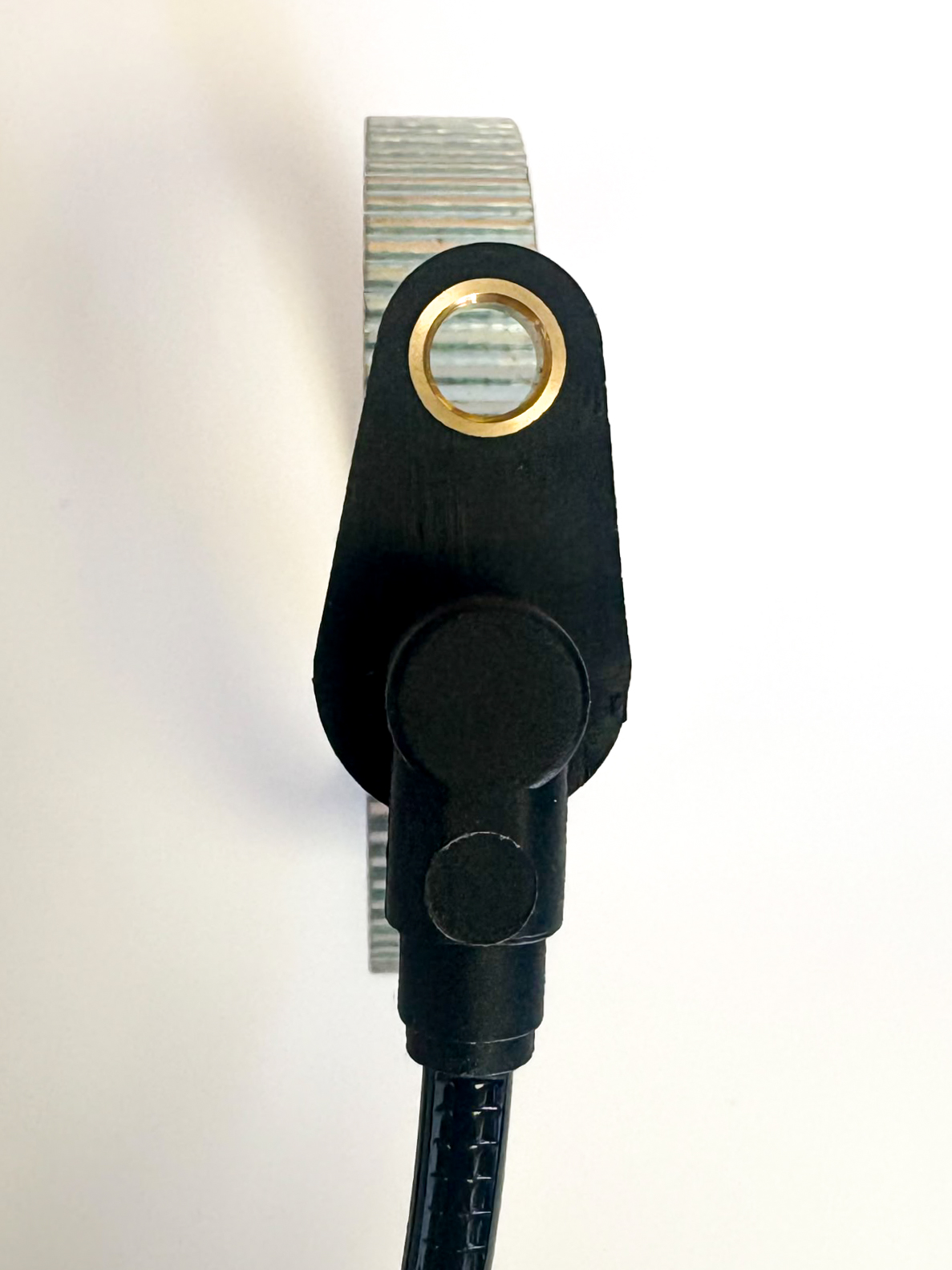
If you are using a metal toothed ABS ring with SCS supplied
wheel speed sensors (of the magnetised type), the sensor needs
to be orientated such that its securing bolt is between 45 degrees and
90 degrees out of line with the edge of the toothed ring as shown in
Figure 7.
Figure 7 : Correct sensor alignment at 90 degrees
If the sensor is orientated between 0 and 45 degrees as shown below
then there will be insufficient signal to drive the control unit. See
Figure 8 below for the incorrect
orientation.
Figure 8 : Incorrect sensor alignment 0 degrees
Sensor to trigger wheel gap. The toothed trigger
wheel (or coded ring) should have its teeth evenly distributed around
the wheel. Trigger wheels with gaps in the teeth cannot be used. The
number of teeth must be entered in the system calibration using DeltaABS
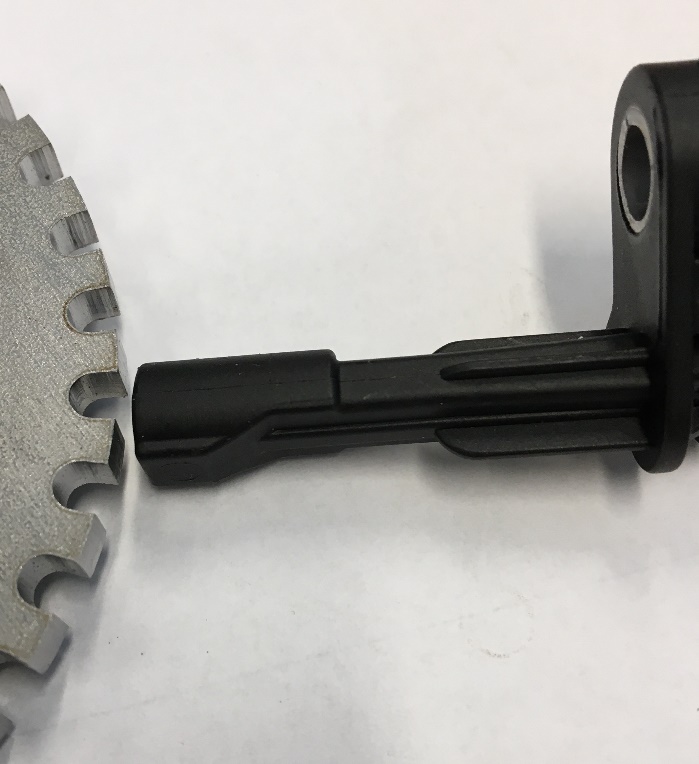
software. The sensor should be installed
such that outside edge of the trigger wheel passes by the tip of the
sensor See Figure 9. The gap to the trigger wheel should be no more than
1mm. Ensure that the trigger wheel does not foul the sensor when the
wheel is spun See Figure 6 for dimensions
Figure 9 : Trigger Wheel to Sensor Gap Less than 1mm
5. Electrical installation
Connect the designated main power and grounds. The loom fuse ratings are ignition 10 A, solenoids 20 A and pump 40 A.
Connect the ABS ON/OFF switch and check that the OFF position is correctly labelled.
Connect vehicle CAN to the auxiliary connector CAN only. Do not connect anything other than the PC USB-CAN interface to the 4-pin DTM connector for the private CAN bus.
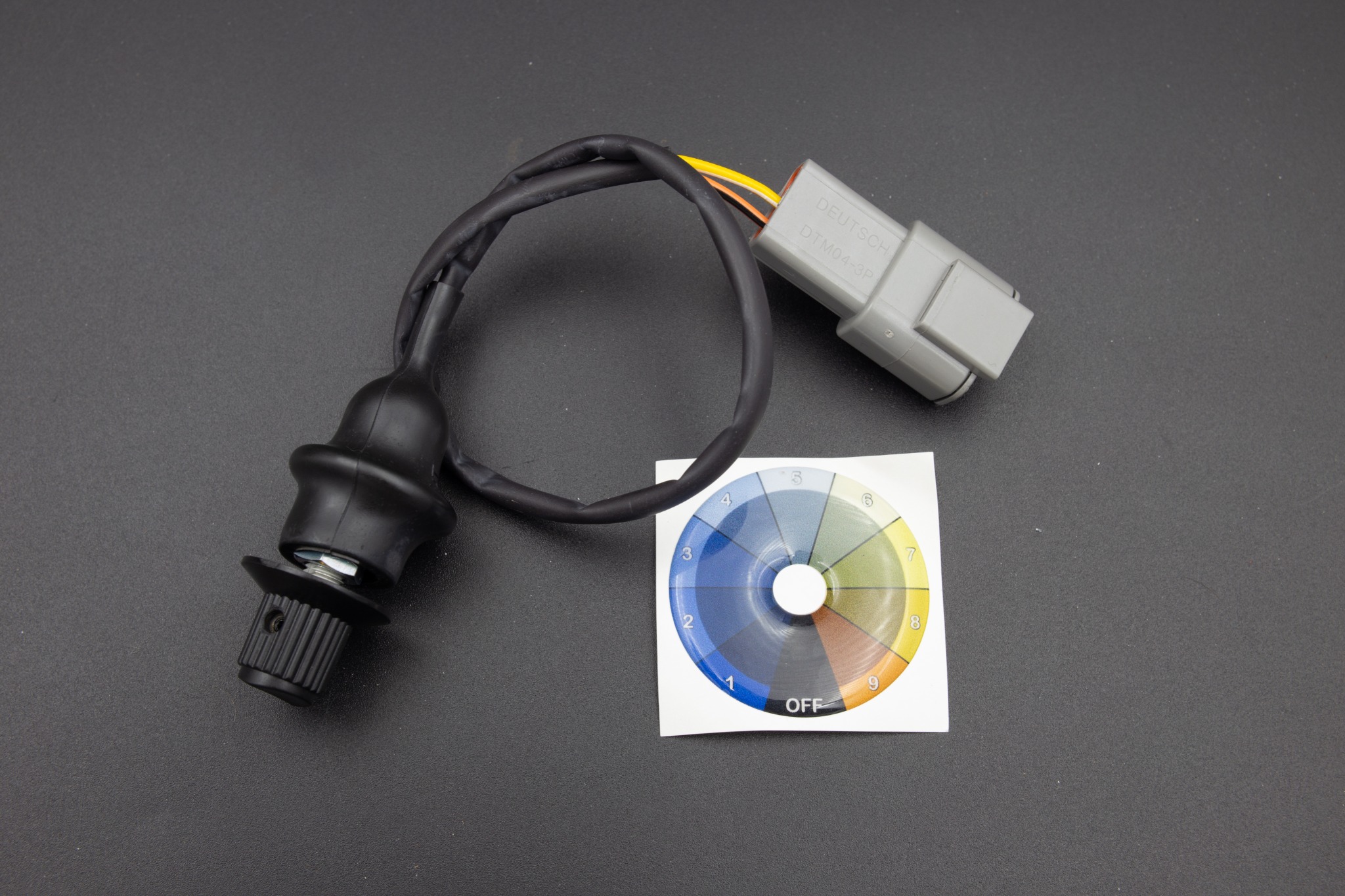
Fit the slip switch carefully, ensuring that the positions correctly line up with the label. Do not attempt to rotate the switch using the knob; either move the label or loosen the switch.
Note that the 12 V connection on the auxiliary connector is an ignition-switched power output for external devices, e.g. data loggers. Do not use this to power up the ABS system. The maximum permitted output current is 5 A.
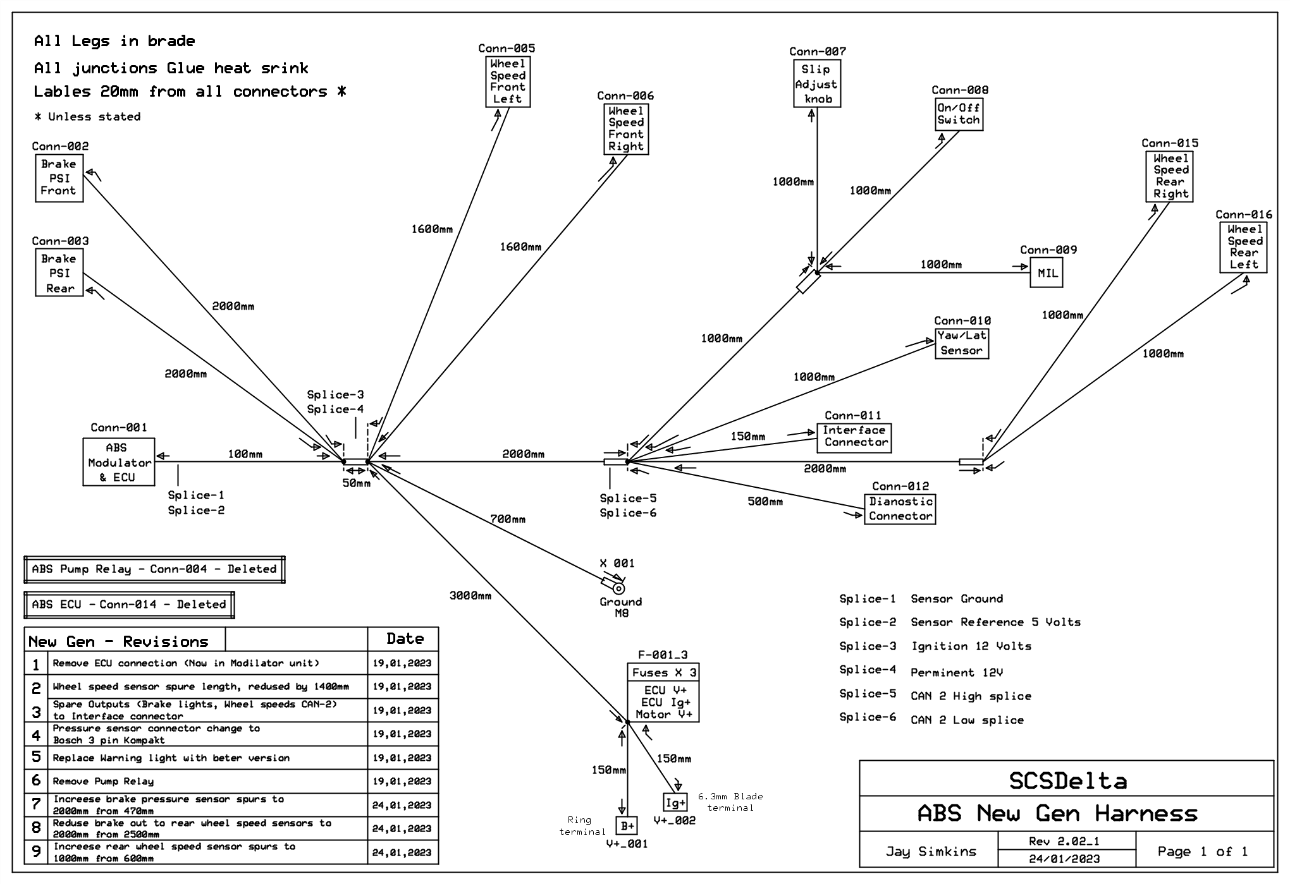
Wiring loom
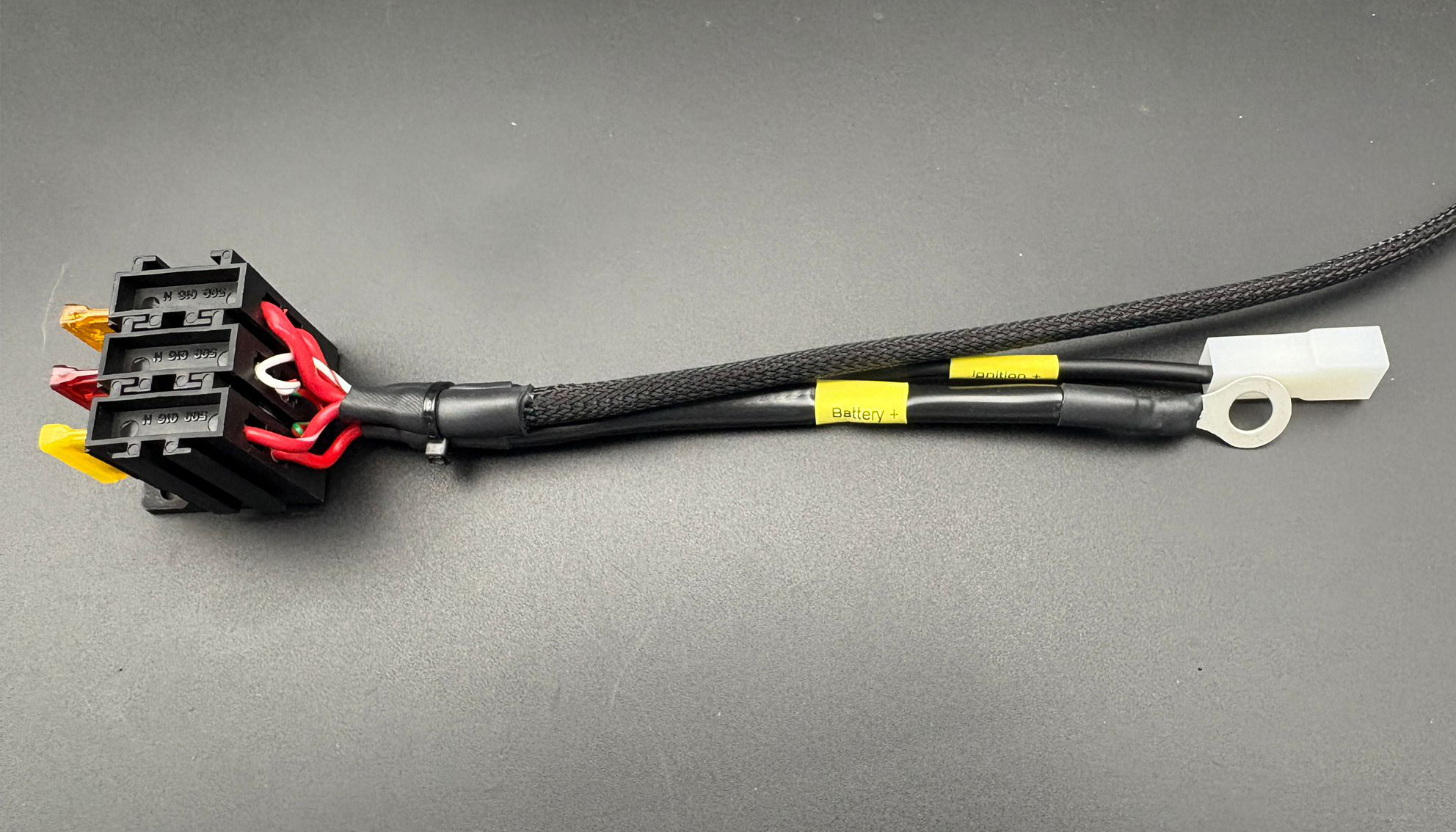
Figure 10: Fuse holder and power connections on the Delta ABS wiring loomFigure 11: Generic wiring loom dimensions
The generic wiring loom
dimensions are such that they provide enough length in all terminations
for all motorsport cars. Excess loom length will need to be gathered and
safely secured. If you have ordered a bespoke loom then the dimensions
should not require any parts of the loom to be gathered up before
securing. The exact dimensions are shown in Figure 11. The loom is
grounded via an 8mm ring tag connector which should go to a clean
chassis ground. The ignition, power and ABS pump supplies are fused on
the loom.
DO NOT MODIFY THE WIRING HARNESS IN ANY WAY, IT WILL VOID THE
WARRANTY
Slip Level Switch
Figure 12: Slip level switch, connector and position label
This switch position is set by the driver according to the track
conditions. It should therefore be installed so that it is within easy
reach of the driver during use. The switch is hole mounted with a
retaining nut – if the angle of the switch needs to be adjusted then the
nut must be loosened first – attempts to rotate the switch may cause
damage that is not covered by our warranty. The kit also includes a
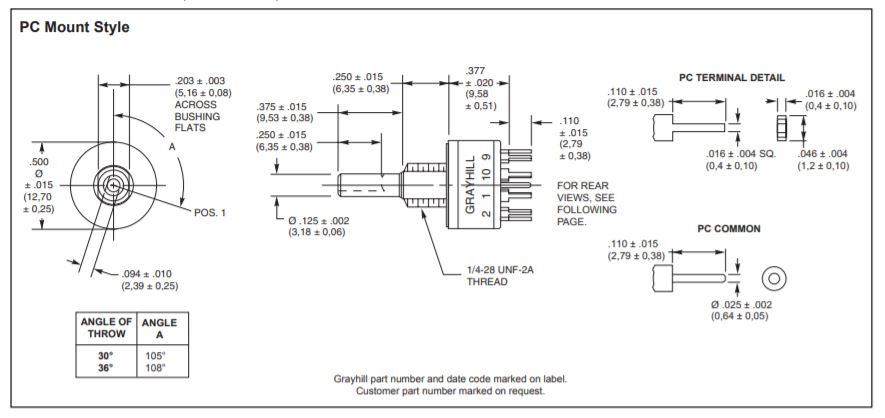
sticker to indicate the slip setting and range. Dimensions are as shown
in Figure 13.
Figure 13: Slip Switch Dimensions
Maximum torque rating for retaining nut = 0.85 Nm (newton meter) 7.5
lb-in (pound inch)
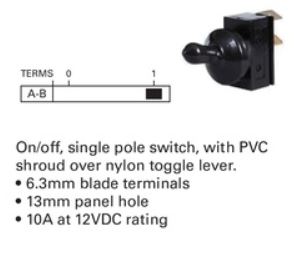
ABS On/Off Switch
Figure 14: ABS On/Off switch
This is a toggle switch which
turns off the ABS function and leaves the driver with standard braking.
This should be fitted within easy reach of the driver in case it
becomes necessary to switch off the ABS function for any
reason. It is a through hole device secured by a nut. This
switch controls the power to the solenoids in the hydraulic unit and
when it is off the ABS cannot operate under any circumstances. The ABS On/Off switch is shown in Figure 14.
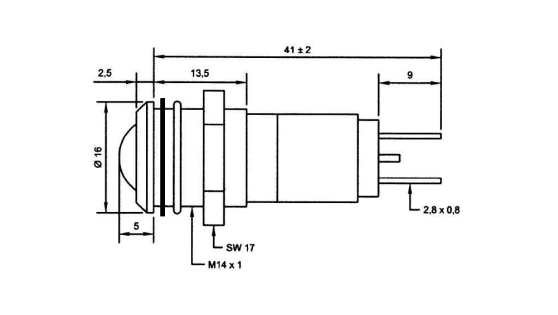
ABS Fault Light
This indicates a fault in the ABS system and should be located in the
line of sight of the driver. It is a through hole device (see Figure 15 below for dimensions).
Figure 15: Warning Light Dimensions
6. Software setup
Install DeltaABS and connect through the service interface using the procedures below. Set CAN speed and configuration for the vehicle.
Software Setup
Our software application, DeltaABS, is used to configure and prepare
the Delta ABS system. The software is free to download and use from our
website www.scs-delta.co.uk.
Choose “Downloads” - “File Repository” and “Delta ABS” from the
homepage. The installer file is named ‘ABS_Setup.exe’.
Google Chrome and Microsoft Edge have recently changed their
permissions for downloading .exe files. If you have issues downloading
the software, you may need to 'Right click' on the File Name and select
'Save link as' to initiate the download. All download warnings from your
browser can be safely ignored. This installation can be used to upgrade
any previous version of DeltaABS. The previous version should be
uninstalled before upgrading.
To install DeltaABS on your PC double click the setup file and follow
the on-screen prompts. DeltaABS application will then be installed onto
your PC.
N.B. You must be logged into your PC as an administrator to install
DeltaABS. If you are not logged on as an administrator on your PC the
installer will give the error message ‘Access Denied’. You can then
right-click on the setup file and select ‘Run as administrator’ to avoid
this.
DeltaABS is suitable only for use with Microsoft Windows 8, 10 or 11
operating systems and can operate on both 32bit and 64bit versions. Note
that Windows needs to be up-to-date before installing our software and
an internet connection is required during the installation process.
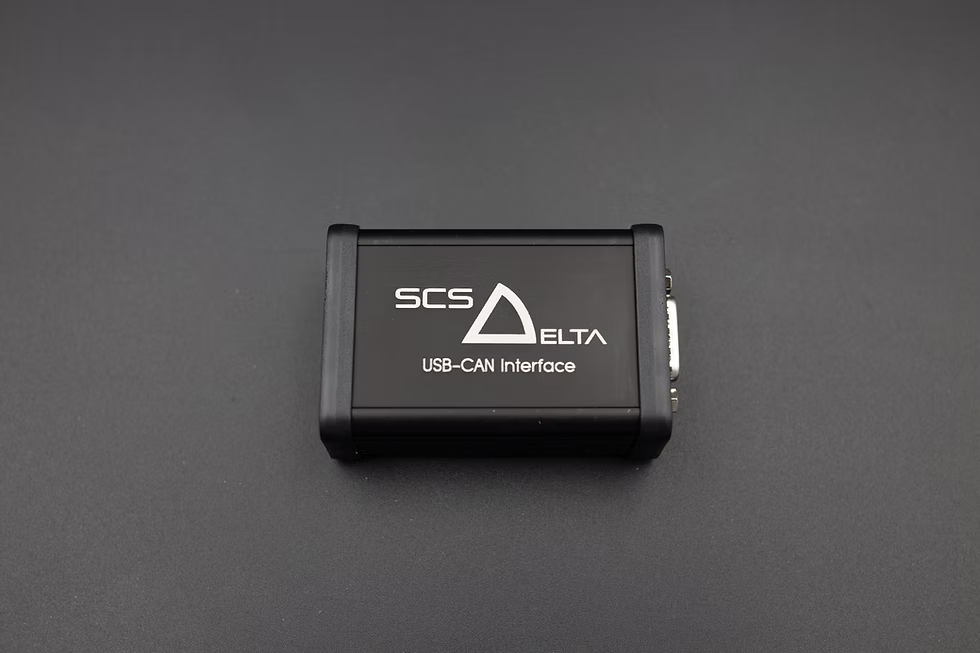
USB-CAN interface and LED indications
Figure 16: SCS Delta USB-CAN interface
USB-CAN interface LED truth table
Green LED
Red LED
Meaning
OFF
OFF
Interface has no power. Check the USB and loom connections.
Continuously ON
Flashing
Interface is powered and communicating on CAN. This is the expected state with the ABS unit powered and communicating.
Continuously ON
OFF
Interface is powered, but CAN communication is not established. Check ABS power and ignition, the interface CAN bus speed and the CAN wiring.
Continuously ON
Continuously ON
Interface is powered, but normal CAN communication is not established. Reboot the interface, then check ABS power and ignition, CAN bus speed and wiring.
The green LED indicates interface power; the red LED indicates CAN communication. The interface and ABS unit must use the same CAN bus speed. The LEDs show the interface status; confirm that DeltaABS reports Connected before proceeding with software setup.
The interface can receive power from both the PC and the loom. To reboot it fully, disconnect both cables for 20 seconds, then reconnect them.
Connecting to the Delta ABS
module
The optional SCS Delta USB-CAN interface is connected to the 4 pin
DTM connector on your ABS loom and to the PC via the supplied USB cable.
NB Do not, under any circumstances, connect any other CAN device
to this private CAN bus connection. Once the USB-CAN interface
has been plugged in to both the loom and the computer, you can power up
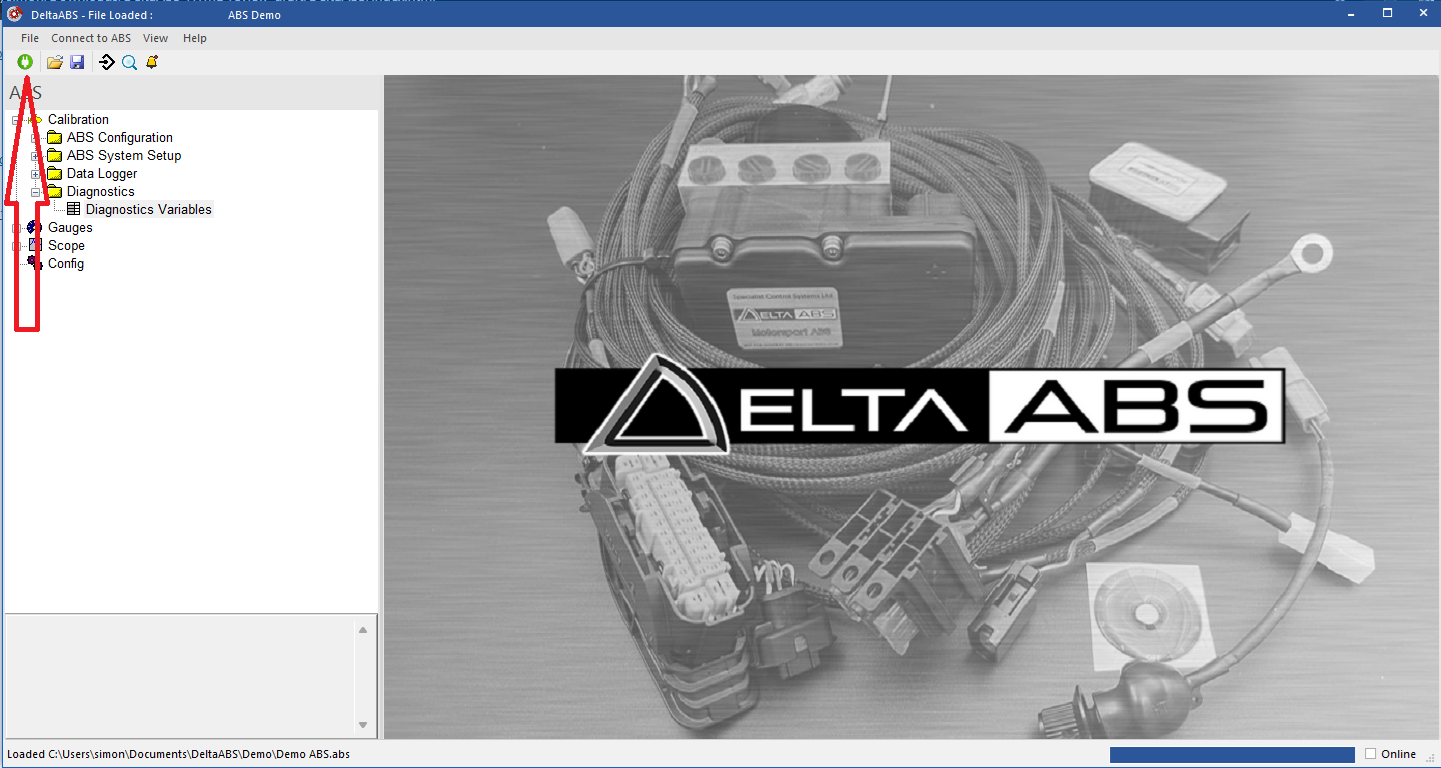
the ABS and then connect to it by pressing the green ‘connect’ button in
DeltaABS. A successful connection is indicated by a diagonal red line
appearing on the connect button. From here it will be possible to check
the installation and bleed the hydraulic system. See Figure 17
below.
Figure 17: Connecting DeltaABS to the ABS unit
7. Static verification
Confirm warning lamp startup test: ON for approximately two seconds, then OFF with no active confirmed fault. The warning lamp is polarity sensitive. Connect the gold tab marked + to the white/red loom wire, and the silver tab marked − to the red/pink loom wire. If it does not illuminate, switch the power off and check the lamp polarity, supply and loom wiring.
Measure ABS supply engine off, engine running and with the pump operating; each reading must remain within 9–16 V.
Confirm IMU orientation and check each physical slip switch position against the software-reported position before fitting the decal.
With all four wheels raised, spin each wheel and match its reported channel to the correct corner.
Apply the pedal and use DeltaABS's release check for each wheel using the full wheel-release procedure below.
Confirm front and rear (if fitted) brake pressure values increase with pedal pressure as expected and validate that adequate brake pressure is reached without the pedal running out of travel.
ABS switch and warning lamp states
Condition
Switch
Lamp
Startup test
ON
ON for about 2 seconds, then OFF if no current fault
ABS ready
ON
OFF
ABS switched off
OFF
ON
Active confirmed fault
ON
ON
Stored fault only
ON
OFF
Using DeltaABS to
check the Installation
Correct installation of the wiring loom and hydraulic lines, as well
as the system’s other components, can be confirmed using DeltaABS
software using the following steps:
Jack the vehicle up so that all 4 wheels are off the ground.
Connect to the system using DeltaABS software.
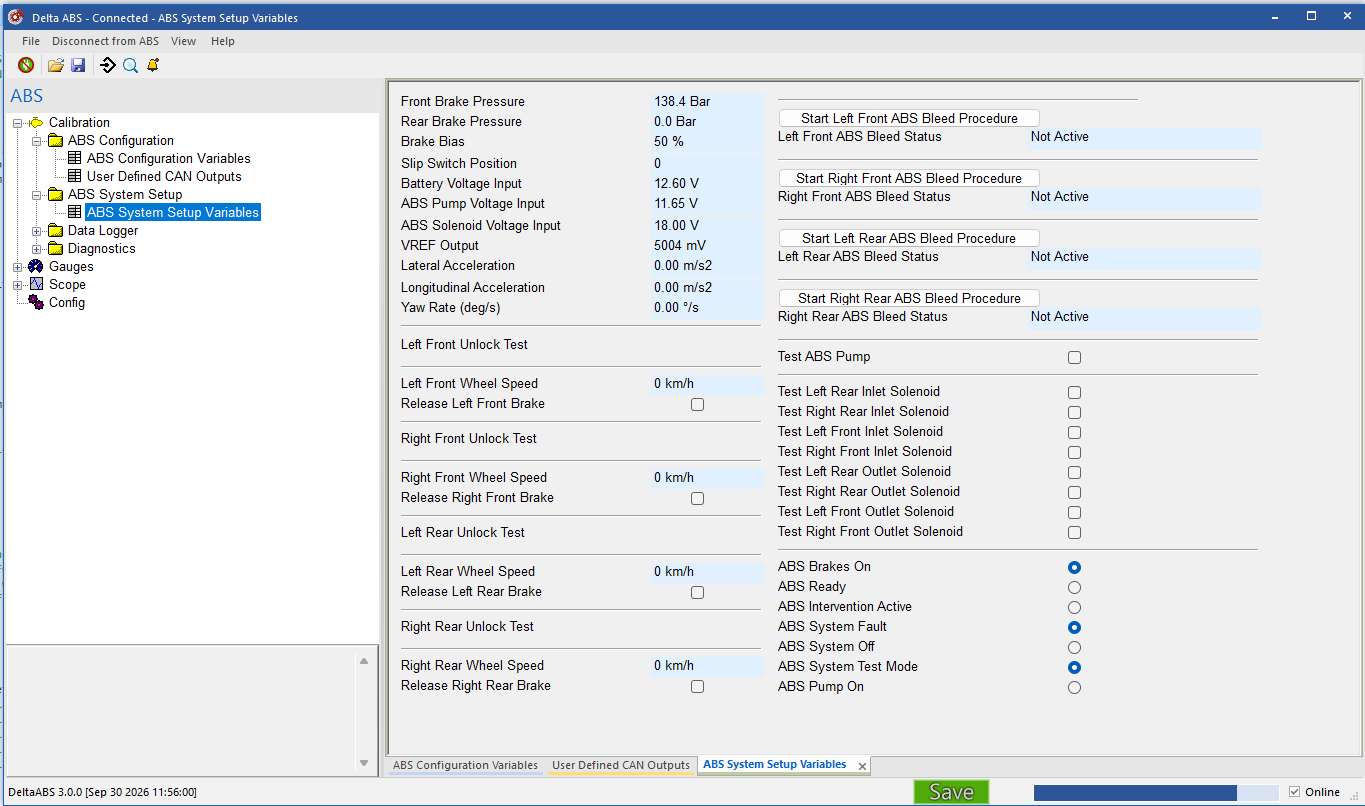
Go to the ABS System Setup Variables
page in DeltaABS. Get an assistant to spin the front left wheel and make
sure a wheel speed value is observed in the box labelled Left
Front Wheel Speed (kmh). This test ensures that the sensor is
connected to the correct connector on the loom.
Figure 18 : System Setup
Apply the brake pedal and check that the assistant can no longer
rotate the front left wheel. Click the checkbox ‘Release Left Front
Brake’. The ABS pump will be heard and the assistant should now be able
to rotate the wheel again. This checks that the hydraulic line has been
installed to its correct port on the Hydraulic Modulator.
Repeat the procedure with the remaining three wheels.
Turn the slip select switch through all its positions and check
the value is changing in the box labelled Slip Switch
Position and that it corresponds to the position labelling
around the switch.
Check that the voltage in the box labelled ABS
Solenoid Voltage Input (V) goes from battery voltage to
~1.6 volts when the ABS on/off switch is turned off.
Check that the brake pressure value rises in the boxes labelled
Front Brake Pressure and Rear
Brake Pressure (if fitted) when the brake pedal is
pressed.
8. Bleeding
Bleeding Procedure
The braking system can be bled in two stages, first the modulator and
then a standard bleed. Follow the procedure below to bleed the
modulator:
It is recommended that you attach a pressure bleeder at the
master cylinder during the following steps.
Set the slip level switch to position 1.
Make sure you have an assistant ready with a spanner on the
caliper bleed valve to be able to open and close the valve when prompted
by the software.
Go to the ABS System Setup Variables
page in DeltaABS. Start by bleeding the wheel furthest from the master
cylinder. If this is the left rear then press Start Left
Rear ABS Bleed Procedure.
When prompted to do so with the message Press Brake Pedal Hard
to Start, apply and maintain brake pressure with the pedal and do
not release the pressure. You will need to hold more than 30 Bar
of brake pressure to start the test. The message box will show
Hold Brake – Pump On and you will hear the modulator’s pump pulse
on and off three times. Make sure you keep the brake pedal pressed hard.
(Note that it is normal for an ABS fault to be set during the bleed
procedure, this does not affect the process).
With the brake pedal still pressed the next message will be
Hold Brake – Open Bleed Valve, at this point have an assistant
immediately open the bleed valve on the caliper and you will feel the
pedal drop to the floor. Keep the pedal pressed.
Next, pump the pedal when the message to do so shows, during this
time valves will turn on and off three times, followed by the ABS valves
turning on and off six times.
When the message Hold Brake - Close Bleed Valve shows,
first have the assistant close the bleed nipple on the caliper, when the
message Release Brake – Completed shows then release the brake
pedal. This completes bleeding of the modulator for this wheel.
Repeat the above process for the remaining wheels.
After the modulator bleed procedure has been completed for all four wheels, a
full standard bleed of the braking system should be carried
out.
9. Dynamic wheel-speed verification
Keep ABS disabled. Log all four wheel speeds through representative speed, braking, cornering and vibration using either the onboard logging or the DeltaABS PC software scope pages. Verify there are no dropouts or implausible readings before enabling ABS.
10. Initial ABS validation
Clear installation-related stored faults and confirm no current faults.
Carry out an initial low-speed intervention test in a controlled setting, then review the recorded data.
Increase braking demand progressively. Complete high-load testing only after earlier stages pass.
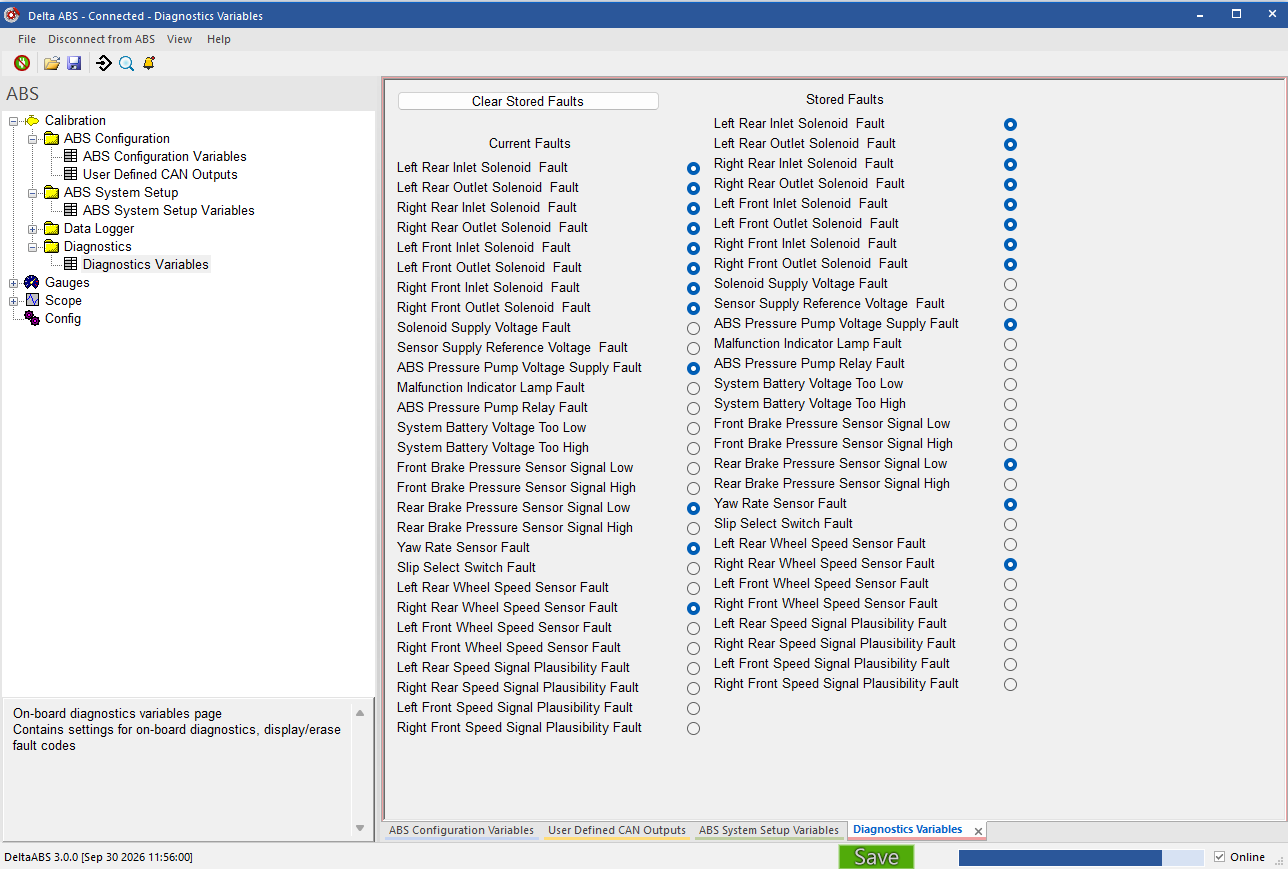
Clear Stored Faults
Temporary faults are often logged whilst installation is being
carried out. These faults will be stored by the ABS ECU even when power
is removed from the system. They should therefore be cleared before
first use so that the system is ready to monitor and store faults which
occur from actual track use. This can be done using DeltaABS in the page
Calibration – Diagnostics - Diagnostics
Variables. See Figure 19 below.
Figure 19 : Diagnostics Variables
The faults are split into two categories, Current
Faults and Stored Faults. Press the
Clear Stored Faults button to manually clear all stored
faults before the system is used.
11. Driver controls and final checks
Explain positions 1–9 (increasing grip, decreasing intervention) and 10 (OFF). Check each physical position against DeltaABS before fitting the label. Never rotate the switch past its end stop or use the knob to align a misplaced label; loosen the retaining nut first or move the label. If the slip position is sent by CAN, verify that the message meets the current specification exactly. Verify warning lamp states and the hardware OFF switch. Never cycle the ABS switch while braking.
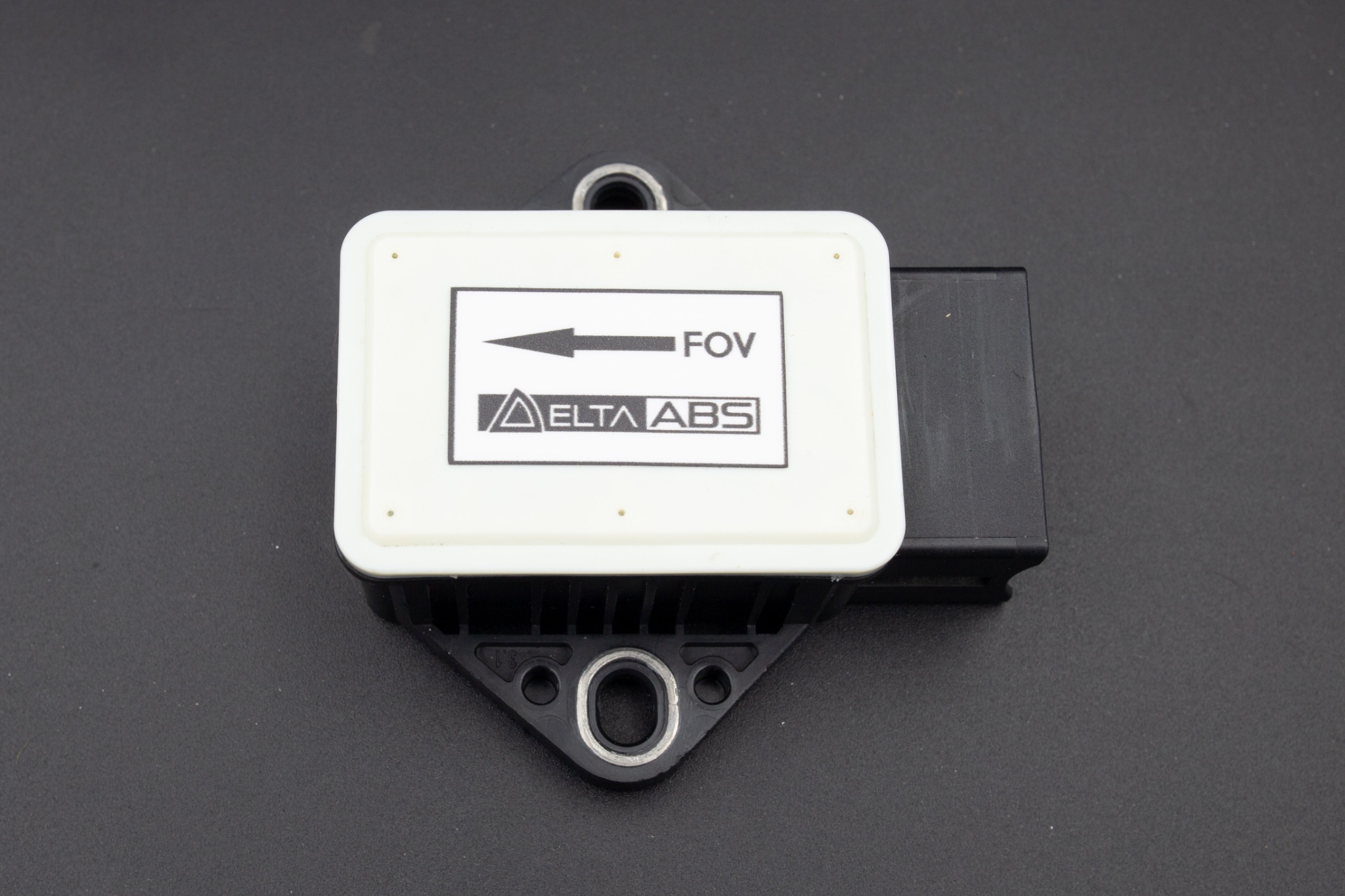
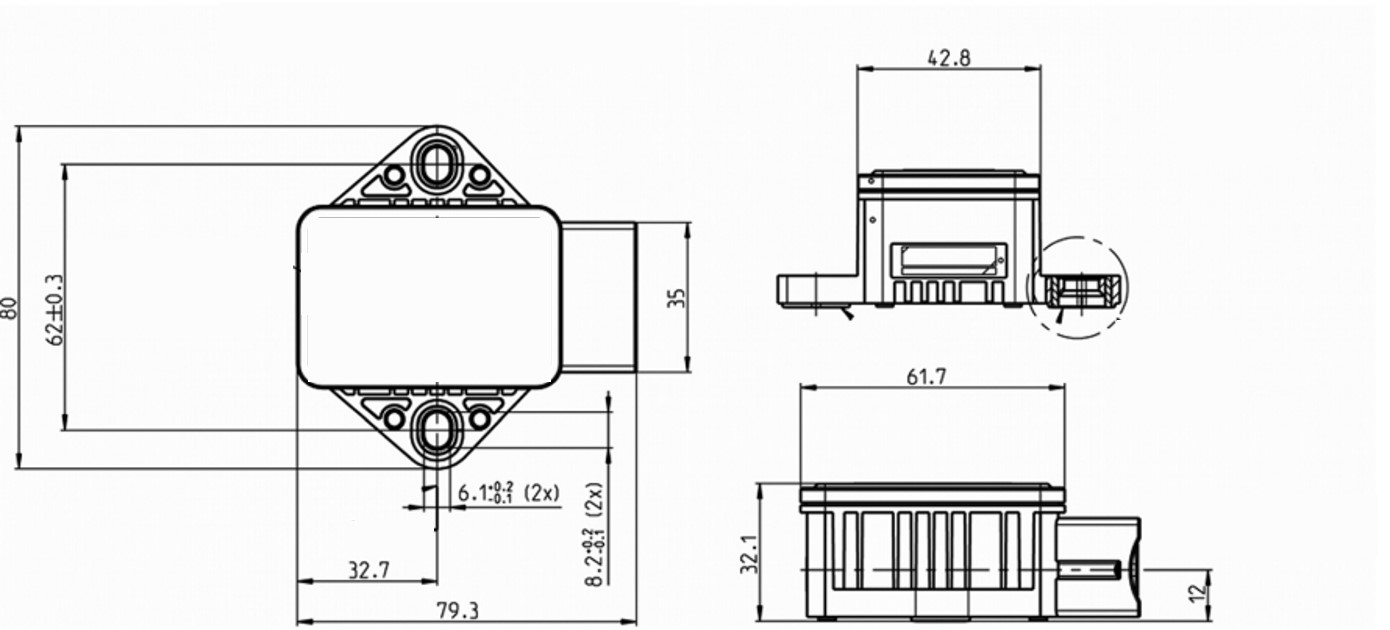
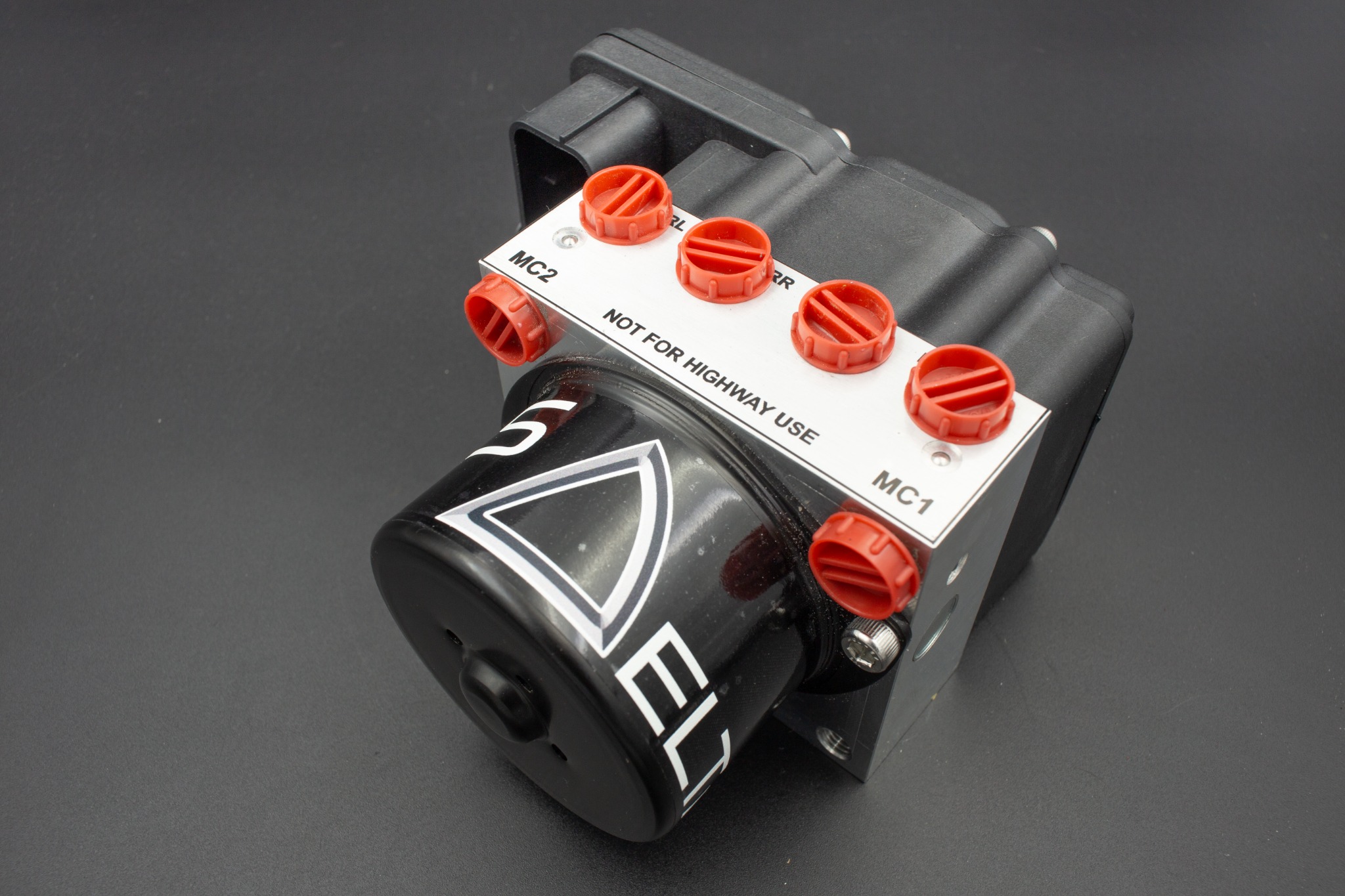
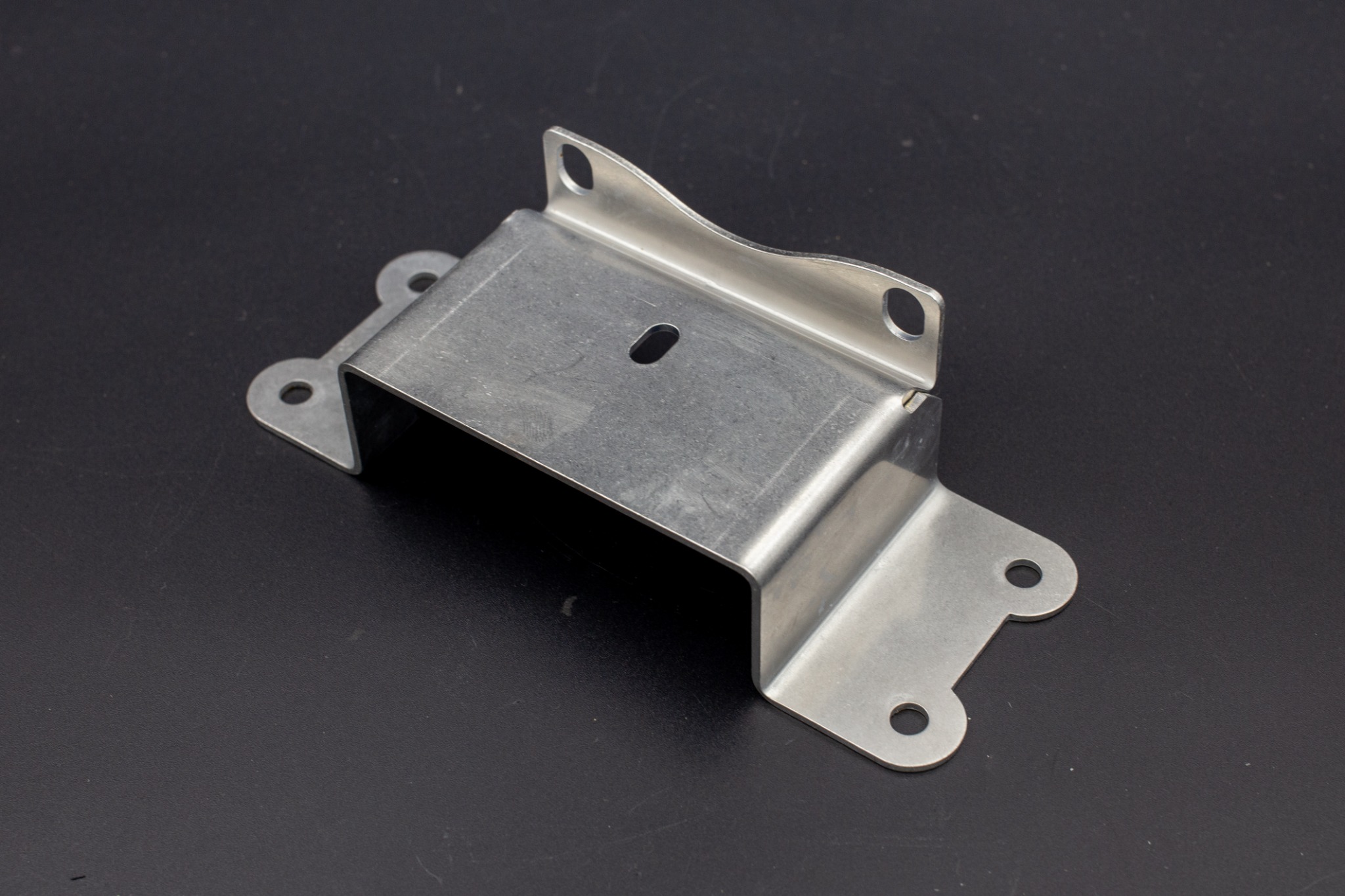
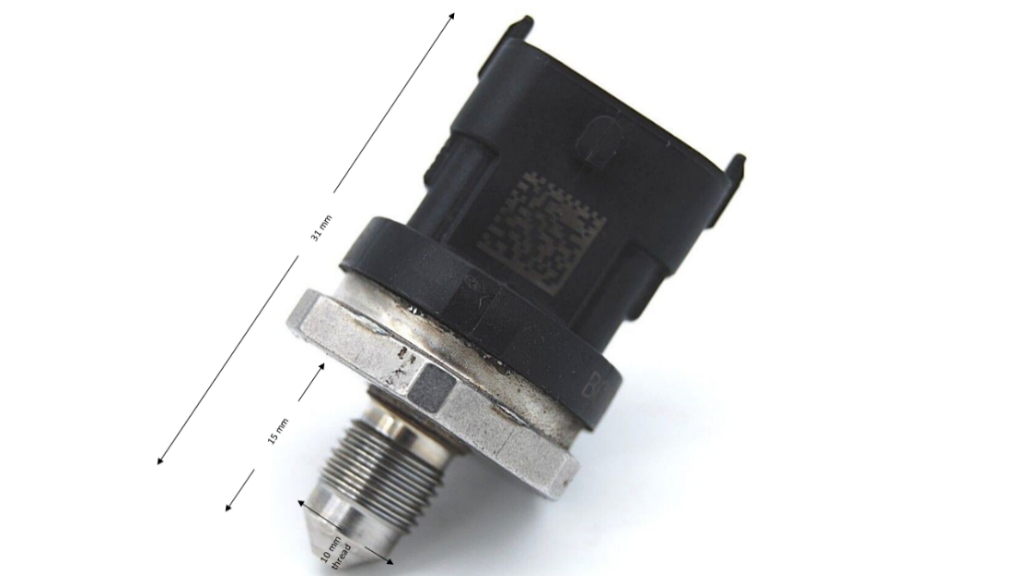
Figure 7 : Correct sensor alignment at 90 degrees